Dashboard¶
failover-dashboard is a self-contained, opt-in, secure-by-default observability dashboard. Drop the dedicated starter on the classpath, enable it in YAML, and open /failover-dashboard to see every @Failover configuration plus live health metrics — rendered as cards and charts, served straight from the jar (no CDN, no build step).
It introduces no new instrumentation: it is a pure consumer of signals the framework already publishes — FailoverScanner for configuration and the Micrometer failover.* meters for metrics.
Obtaining the Dashboard¶
The default failover-spring-boot-starter ships none of this. Add the dedicated starter:
<dependency>
    <groupId>com.societegenerale.failover</groupId>
    <artifactId>failover-dashboard-spring-boot-starter</artifactId>
</dependency>
Adding the jar makes the dashboard available, not active. Nothing is mapped until you enable it.
Enabling It¶
enabled is the only switch you must set — everything else has a working default:
Once enabled, the UI and the full JSON API are served. The granular flags below exist only to narrow exposure, never to opt in to it.
| URL | Serves |
|---|---|
/failover-dashboard | the UI (bare path forwards to index.html) |
/failover-dashboard/api/config | every @Failover point + global settings |
/failover-dashboard/api/config/settings | effective global failover.* / failover.dashboard.* config, grouped |
/failover-dashboard/api/failover-health | actuator-style overall status + active configuration |
/failover-dashboard/api/metrics | global + per-API KPIs and rates |
/failover-dashboard/api/metrics/source | metrics provenance (mode, instances reporting, freshness) for the UI source badge |
/failover-dashboard/api/health | per-API health classification — windowed (last health.sample-size calls), not lifetime-cumulative |
/failover-dashboard/api/health/upstream | rolling last-N-calls rates per failover point, scored on the upstream call alone (not masked by recovery) — powers the Upstream call health cards; empty map on sources with no per-call window (Prometheus / shared-store) |
/failover-dashboard/api/metrics/exceptions | per-failover-endpoint exception counts (local source only; empty map otherwise) — powers the Overview exceptions-per-endpoint chart and the Health tab's per-card top exception |
/failover-dashboard/api/metrics/series | trend samples — local: the in-memory ring (empty unless history is enabled); mode=prometheus: cluster-wide via query_range |
/failover-dashboard/api/instances | per-instance metrics for the Instances tab — empty in local (single JVM); populated in shared-store / prometheus |
/failover-dashboard/api/cluster/snapshot | (shared-store only, POST) peer snapshot ingest |
base-path is a single dedicated, non-root namespace covering both the UI and the API; override it to relocate the whole dashboard. server.servlet.context-path still prepends as usual.
Configuration¶
Every failover.dashboard.* property in one place. enabled is the only one you need — the rest have working defaults and exist to narrow exposure, secure the gate, or turn on trend history.
failover:
  dashboard:
    enabled: false                   # master switch (secure-by-default) — set true to map anything
    base-path: /failover-dashboard   # single dedicated namespace for the UI + API
    exposure: # defaults expose everything; set flags only to NARROW
      ui: true                       # serve the static HTML/JS UI
      api: true                      # serve the JSON API
      include: [ config, failover-health, metrics, health, cluster, instances ]  # which API endpoints are served
    security:
      type: AUTHORITY                # ROLE (hasRole) | AUTHORITY (hasAuthority, default) | EXPRESSION (SpEL)
      role: FAILOVER_ADMIN           # role used when type=ROLE
      authority: FAILOVER_ADMIN      # authority used when type=AUTHORITY (default)
      expression: ""                 # SpEL used when type=EXPRESSION, e.g. "hasAnyRole('ADMIN') or hasAnyAuthority('WRITE_PRIVILEGE')"
      #   required (non-blank) when type=EXPRESSION — fails fast at startup otherwise
      allow-insecure: false          # start unsecured + loud WARN when Spring Security is absent
      #   (dev / trusted-network only; REFUSED under the 'prod' profile)
    history: # opt-in server-side trend ring buffer (see Trend History below)
      enabled: false                 # enable the sampler + /api/metrics/series endpoint
      samples: 120                   # ring-buffer capacity (retained sample count)
      sample-interval-seconds: 15    # seconds between samples
    health: # healthyRate thresholds for the per-API status badge
      degraded-threshold: 0.99       # >= ⇒ HEALTHY; below (down to unhealthy floor) ⇒ DEGRADED
      unhealthy-threshold: 0.90      # >= ⇒ DEGRADED; below ⇒ UNHEALTHY
      sample-size: 100               # rate computed over only the last N calls per failover point, not the lifetime total (must be > 0)
    cluster: # where metrics are read from across instances (see Distributed Deployment)
      mode: local                    # local (default) | prometheus | shared-store
      prometheus: # used when mode=prometheus (aggregates failover.* across instances)
        base-url: ""                 # e.g. http://prometheus:9090 (blank ⇒ falls back to local)
        token: ""                    # optional bearer token (blank ⇒ none)
        timeout-seconds: 5           # per-query connect/read timeout
      shared-store: # used when mode=shared-store (peers push snapshots, aggregated in-app)
        store: inmemory              # inmemory (default) | jdbc (needs failover-dashboard-snapshotstore-jdbc)
        liveness-seconds: 180        # heartbeat age before an instance is DOWN (≈ 3 × peer heartbeat interval)
        max-instances: 10            # supported ceiling (warns beyond — graduate to prometheus)
        instance-retention: 7d       # retire unseen instances from the Instances tab (counts stay in the aggregate; 0 ⇒ never)
        sample-interval-seconds: 30  # cluster-trend sampling cadence
        retention:
          max-age: 7d                # trend-history age bound
          max-entries: 100000        # trend-history size bound (oldest truncated)
        jdbc: # used when store=jdbc; table must be created by the consuming service — see Scenario D for DDL
          table-prefix: ""           # prepended to FAILOVER_DASHBOARD_SNAPSHOT (validated)
      snapshot: # peer-side push (every instance, incl. non-UI nodes)
        publish-url: ""              # dashboard ingest URL (blank ⇒ this instance does not push)
        interval-seconds: 15         # at most one push per interval (event-driven, throttled)
        retry-interval-seconds: 300  # suppress push attempts for this long after a failure
        username: ""                 # ingest Basic-auth (set with password; ignored when oauth2 id set)
        password: ""
        oauth2-client-registration-id: ""  # Bearer auth via OAuth2 client (takes priority over Basic)
        allow-insecure-ingest: false # suppress the no-auth ingest warning (trusted networks only)
        heartbeat:
          enabled: false             # lightweight liveness pings to the dashboard
          interval-seconds: 60       # keep ≤ ⅓ of the dashboard liveness-seconds
        ingest:
          enabled: true              # dashboard-side: map POST /api/cluster/snapshot at all.
          #   set false once every peer writes JDBC-direct instead (see Scenario D2) — the
          #   dashboard still reads from SnapshotStore, this only stops mapping the HTTP path.
        jdbc:                        # peer-side JDBC-direct transport (Scenario D2) — mutually
          enabled: false             # exclusive with publish-url; requires this peer's own DataSource
          table-prefix: ""           # MUST match the dashboard's shared-store.jdbc.table-prefix
| Property | Default | Purpose |
|---|---|---|
enabled | false | Master switch. Nothing is mapped until true. |
base-path | /failover-dashboard | Dedicated namespace for UI + API. Must start with /, not be /, no trailing / — else the context fails fast. |
exposure.ui | true | Serve the static UI. false = API-only. |
exposure.api | true | Serve the JSON API. false = UI-only. |
exposure.include | all of them | UI-facing read API endpoints served: config, failover-health, metrics, health, cluster, instances. Trim to narrow; an omitted endpoint returns 404. /api/metrics/series is gated with metrics; /api/instances with instances; cluster read views (e.g. the Instances tab's cluster data) with cluster. Does not gate POST /api/cluster/snapshot (peer ingest) — that write path is exempt from exposure narrowing on purpose and has its own dedicated access control; see exposure.include vs. ingest access control. |
security.type | AUTHORITY | Authorization strategy: ROLE (role-based, hasRole), AUTHORITY (authority-based, hasAuthority; default), or EXPRESSION (SpEL, WebExpressionAuthorizationManager). |
security.role | FAILOVER_ADMIN | Role required for base-path/** when type=ROLE and Spring Security is present. Ignored otherwise. |
security.authority | FAILOVER_ADMIN | Authority required for base-path/** when type=AUTHORITY (default) and Spring Security is present. Ignored otherwise. |
security.expression | (none) | SpEL expression evaluated for base-path/** when type=EXPRESSION. Required (non-blank) when type=EXPRESSION — the context fails fast at startup otherwise. Ignored otherwise. See Expression-based access control below. |
security.allow-insecure | false | When Spring Security is absent: false fails fast (fail-closed); true starts unsecured with a loud WARN. Refused under the prod profile. |
history.enabled | false | Turn on the server-side trend ring buffer + /api/metrics/series. |
history.samples | 120 | Retained sample count (ring-buffer capacity). |
history.sample-interval-seconds | 15 | Seconds between samples. |
health.degraded-threshold | 0.99 | Healthy-rate floor for HEALTHY. |
health.unhealthy-threshold | 0.90 | Healthy-rate floor for DEGRADED; below is UNHEALTHY. |
health.sample-size | 100 | The healthy-rate above is computed over only the most recent sample-size calls per failover point, not the lifetime total — a cumulative rate never fully recovers from an old bad spell. Also sizes the rolling window backing the Upstream call health cards. Rejected (context fails fast) if <= 0. |
cluster.mode | local | Where metrics are read from. local = this instance's registry (default). prometheus aggregates failover.* across instances via the Prometheus HTTP API. shared-store aggregates pushed per-instance snapshots in-app (small clusters, no Prometheus). See Distributed Deployment. |
cluster.prometheus.base-url | "" | Prometheus base URL for mode=prometheus (e.g. http://prometheus:9090). Blank, or unreachable at runtime, falls back to the local registry with a warning. |
cluster.prometheus.token | "" | Optional bearer token for Prometheus. |
cluster.prometheus.timeout-seconds | 5 | Per-query connect/read timeout. |
cluster.shared-store.store | inmemory | inmemory (default) or jdbc (durable; needs the failover-dashboard-snapshotstore-jdbc module + a DataSource). |
cluster.shared-store.liveness.enabled | false | Dashboard-side toggle for heartbeat liveness tracking (ADR 66) — off by default, independent of the peer-side cluster.snapshot.heartbeat.enabled. See Instance Live Tracking. |
cluster.shared-store.liveness-seconds | 180 | Heartbeat age threshold — instance is DOWN after this many seconds without a heartbeat ping. Default matches 3 × the peer default heartbeat.interval-seconds (60s). Only relevant when liveness.enabled=true. |
cluster.shared-store.max-instances | 10 | Supported small-cluster ceiling; exceeding it logs a warning. |
cluster.shared-store.instance-retention | 7d | Retire instances not seen for this long from the Instances tab (their counts stay in the aggregate; 0 keeps every instance forever). |
cluster.shared-store.sample-interval-seconds | 30 | Cluster-trend sampling cadence. |
cluster.shared-store.retention.max-age / .max-entries | 7d / 100000 | Trend-history age and size bounds (oldest truncated). |
cluster.shared-store.jdbc.table-prefix | "" | Snapshot table prefix (validated), when store=jdbc. The table is never created or altered by the module — see Scenario D for the DDL to provision it yourself. |
cluster.snapshot.publish-url / .interval-seconds | "" / 15 | Peer-side push. Set to the dashboard's base URL (same as base-path on the dashboard host): http://<host>:<port>/failover-dashboard. The snapshot and heartbeat endpoints are derived automatically (/api/cluster/snapshot, /api/cluster/heartbeat). Blank ⇒ this instance does not push. |
cluster.snapshot.retry-interval-seconds | 300 | After a push failure, further push attempts are suppressed for this many seconds (one WARN on first failure, INFO on recovery). |
cluster.snapshot.username / .password | "" | HTTP Basic Auth credentials for the ingest endpoint. Ignored when oauth2-client-registration-id is set. |
cluster.snapshot.oauth2-client-registration-id | "" | Spring OAuth2 client id for Bearer auth (takes priority over Basic). |
cluster.snapshot.allow-insecure-ingest | false | Suppress the no-auth startup warning (dev / trusted network only). |
cluster.snapshot.heartbeat.enabled | false | Send lightweight heartbeat pings from this peer. Off by default. publish-url must be set; heartbeat URL is always derived as {publish-url}/api/cluster/heartbeat. |
cluster.snapshot.heartbeat.interval-seconds | 60 | Ping cadence. Keep ≤ ⅓ of the dashboard liveness-seconds. |
cluster.snapshot.ingest.enabled (dashboard-side) | true | Whether POST /api/cluster/snapshot and POST /api/cluster/heartbeat (ClusterSnapshotController / ClusterHeartbeatController — one switch, both endpoints) are mapped at all. Set false once every peer writes JDBC-direct instead (Scenario D2) — the dashboard still reads from SnapshotStore / HeartbeatStore, this only stops mapping the HTTP paths (and their ingest security gate). Not read by peers. |
cluster.snapshot.jdbc.enabled (peer-side) | false | JDBC-direct transport (Scenario D2): this peer writes its snapshot straight into FAILOVER_DASHBOARD_SNAPSHOT instead of POSTing. When snapshot.heartbeat.enabled=true is also set, the heartbeat rides the same transport into FAILOVER_DASHBOARD_HEARTBEAT. Requires this peer's own DataSource pointed at the dashboard's database. Mutually exclusive with publish-url — setting both fails fast at startup. Not read by the dashboard. |
cluster.snapshot.jdbc.table-prefix (peer-side) | "" | Table prefix for JDBC-direct writes (both the snapshot and, when enabled, the heartbeat table); must match the dashboard's cluster.shared-store.jdbc.table-prefix — both sides read/write the same tables. Not read by the dashboard. |
See the Properties Reference for the canonical table.
The Toolbar¶
Every view shares the top bar:
- Status chip — overall live status (
Healthy/Degraded/Unhealthy), derived from the worst per-API health. - Tabs —
Overview,Per-API,Instances(cluster modes only — hidden inlocal),Health,Config(Overview is the default; the open tab is kept in the URL hash, e.g.#per-api). - Auto-refresh — selectable cadence:
off,10s,30s,1m,10m,1h(default30s). - Refresh now (
⟳) — reload immediately, independent of the cadence. - Last-updated — timestamp of the last successful load.
- Theme toggle (
◐) — switch dark / light (or force it with?theme=dark/?theme=light). - Docs — the failover icon opens this documentation in a new tab.
All controls carry hover tooltips. Dark is the default "control-room" theme; both themes are shown for each view below.
The Views¶
Overview¶
The at-a-glance health and KPI surface.
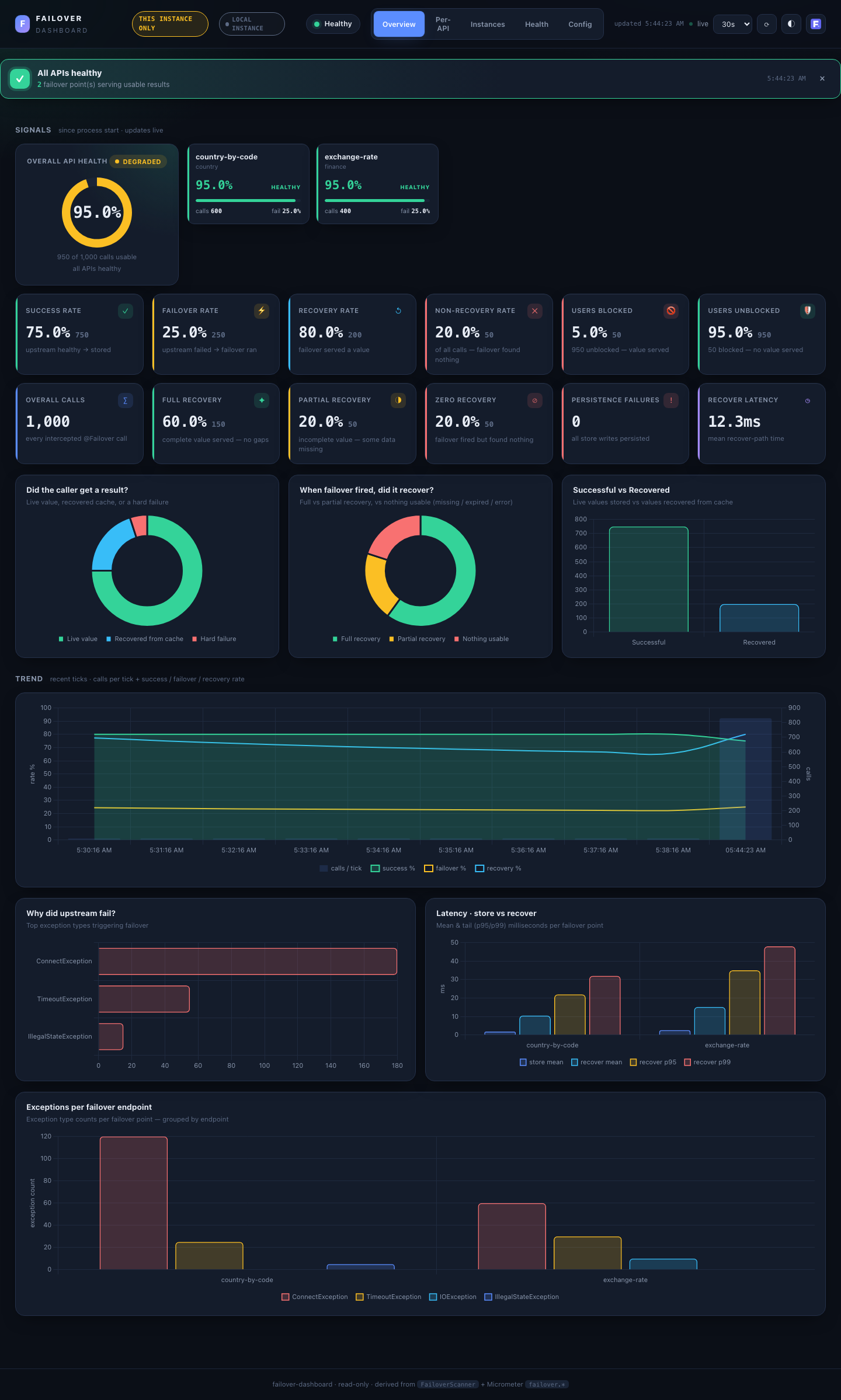
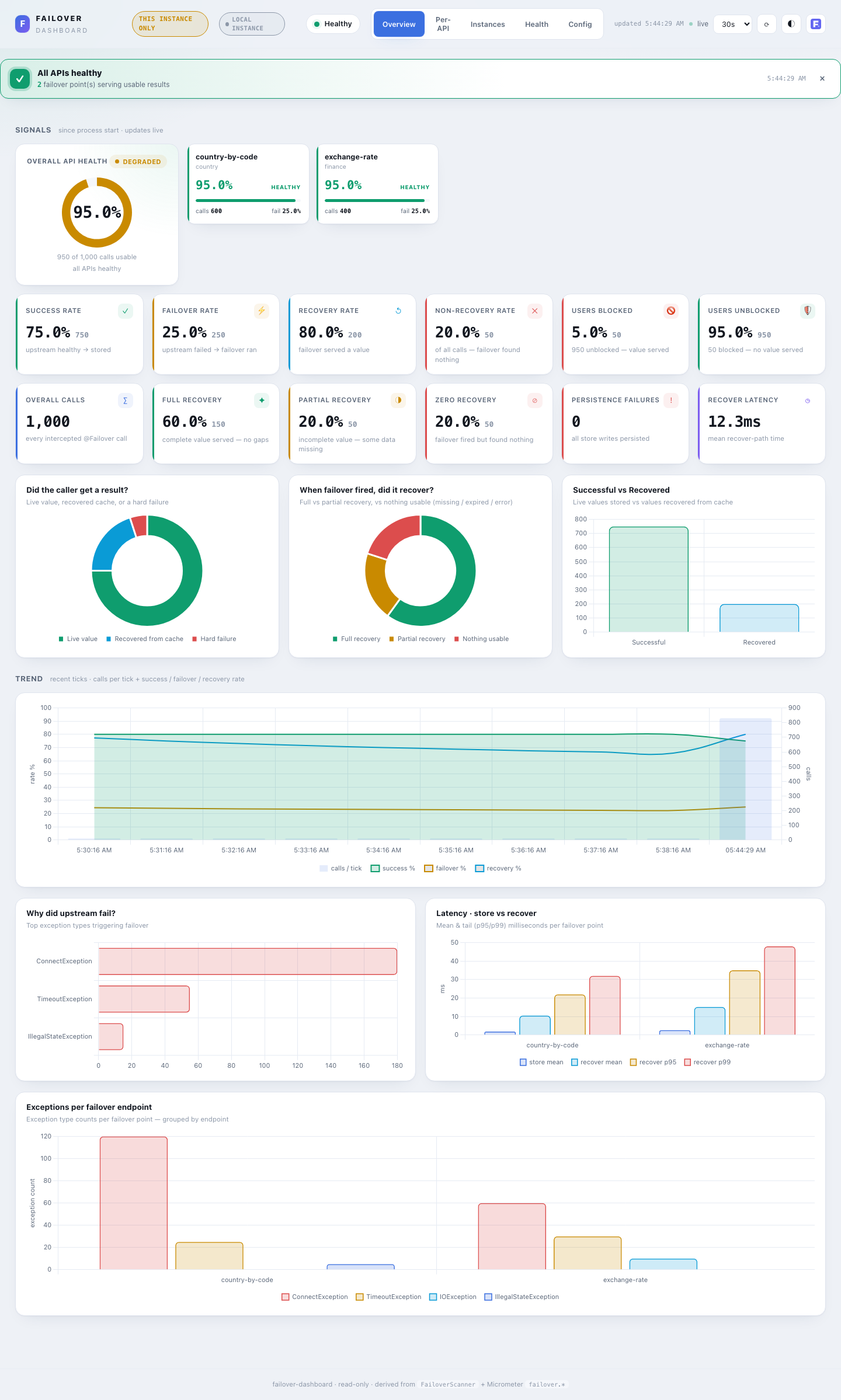
- Health banner — a closable, colour-coded summary shown on each load: all APIs healthy (green), N need attention (amber, names listed), or N unhealthy — action needed (red).
- Signals — row 1 (health): a large Overall API Health gauge (the
(success + recovered) / totalhealthy-served rate) beside a grid of per-API health cards, sorted worst-first so a struggling API surfaces top-left. Each card shows its health %, status, calls and failover %. - Signals — row 2 (metrics): one card per KPI — Overall calls, Success rate, Failover rate, Recovery rate, Non-recovery rate (each rate shows the underlying count too), Persistence failures (async store writes that were lost — alert on any non-zero), and Recover latency (mean recover-path ms).
- Charts: Did the caller get a result? (live value / recovered / hard failure), When failover fired, did it recover? (full / partial / nothing usable — partial = scatter-gather slices), Successful vs Recovered, a full-width Trend (calls per tick + success / failover / recovery rate over time), Why did upstream fail? (top exception types), and Latency — store vs recover per API.
Per-API¶
Drill-down per failover point.
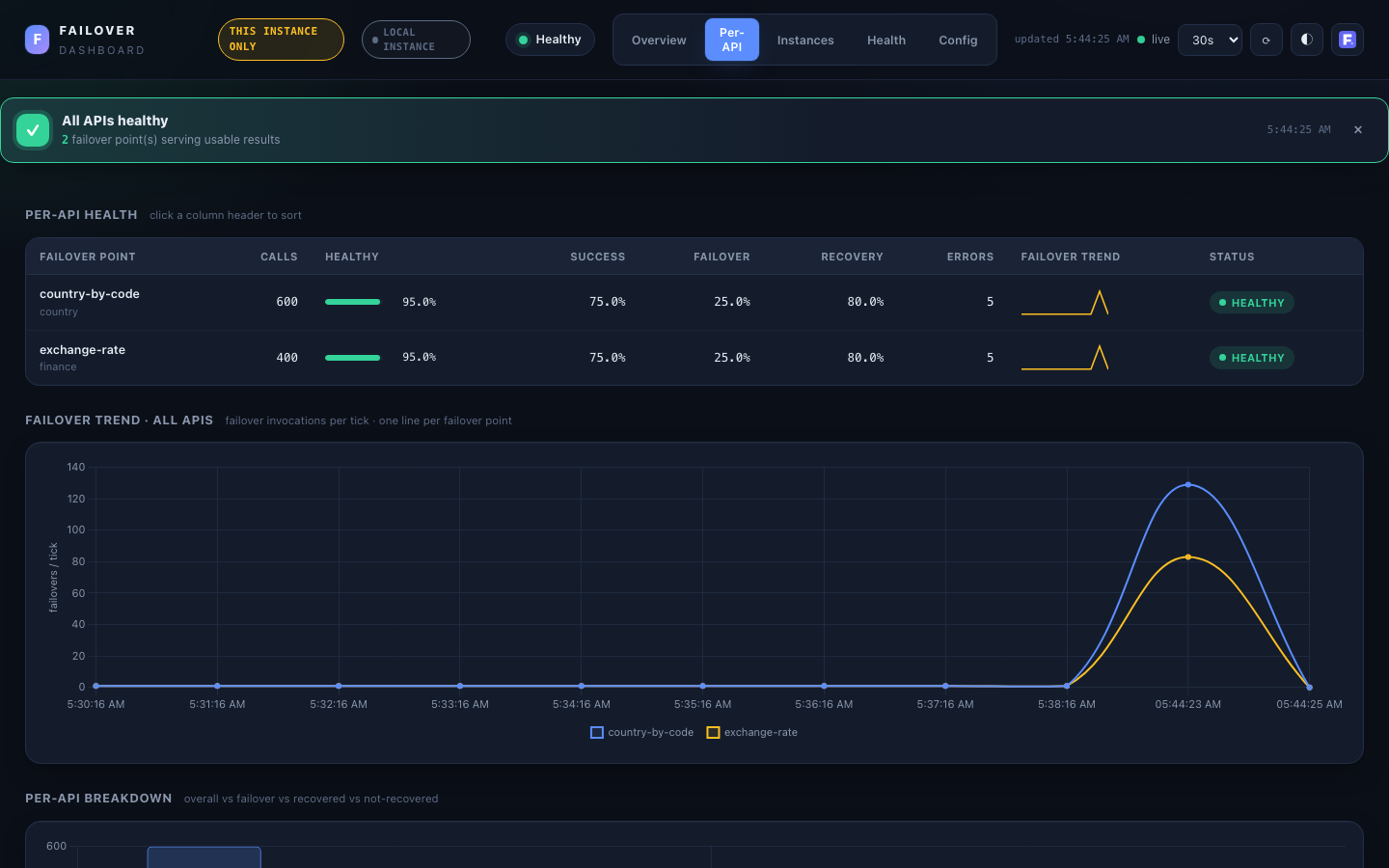
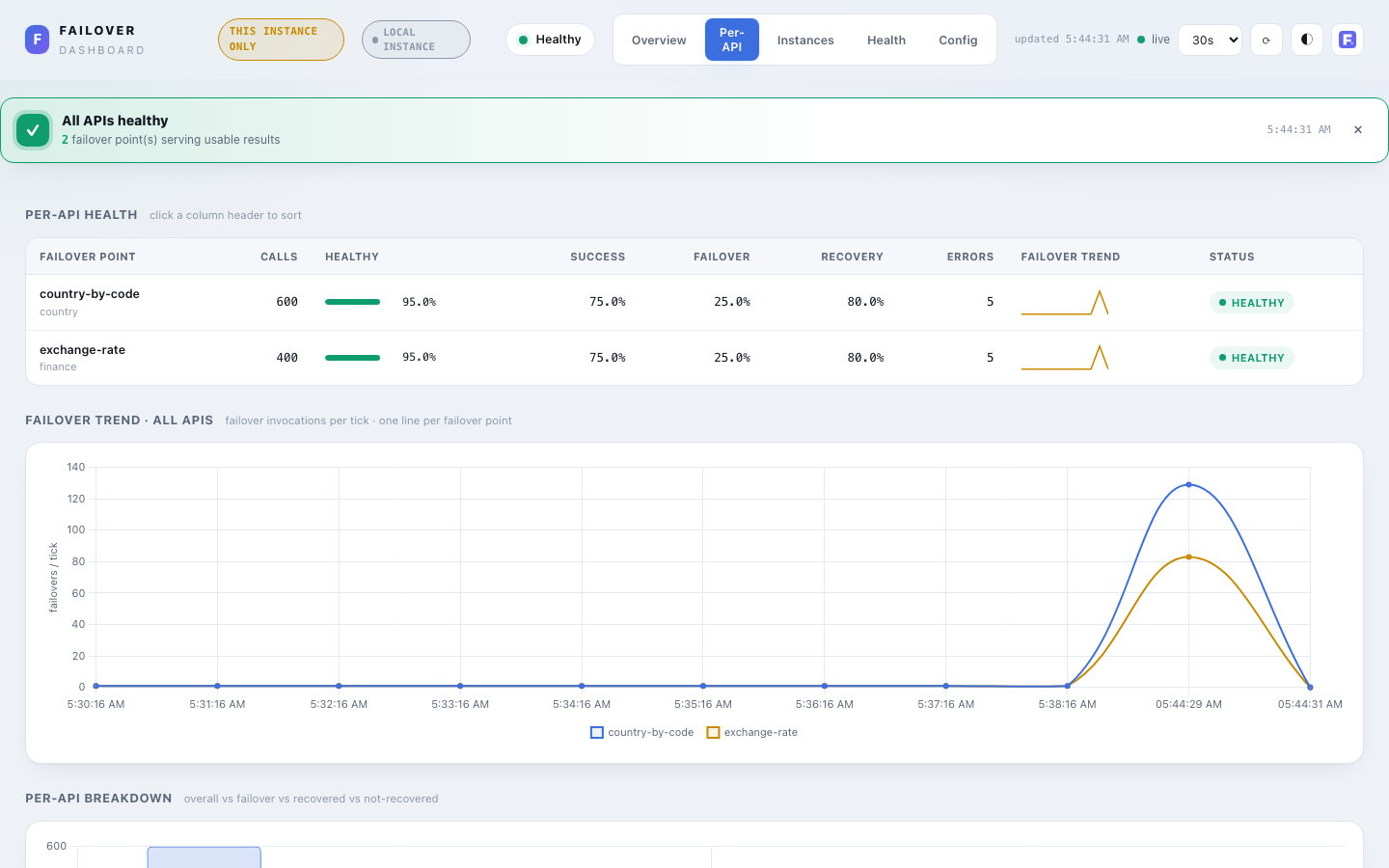
- Per-API health table — sortable (click any header): calls, healthy-rate bar, success / failover / recovery %, not-recovered (missing/expired cache entry) and errors (threw during recovery) as separate columns — a row can be
UNHEALTHYwitherrors=0when every failure is a miss/expiry, not a thrown exception — an inline failover-trend sparkline, and aHEALTHY/DEGRADED/UNHEALTHYbadge. - Failover trend — all APIs — one line per failover point, failover invocations per tick.
- Per-API breakdown — grouped bars: overall vs failover vs recovered vs not-recovered.
- Latency (on Overview) shows store/recover mean plus p95/p99 when available (
local+prometheus);shared-storeshows mean/max only (percentiles can't be merged from per-instance snapshots).
Instances¶
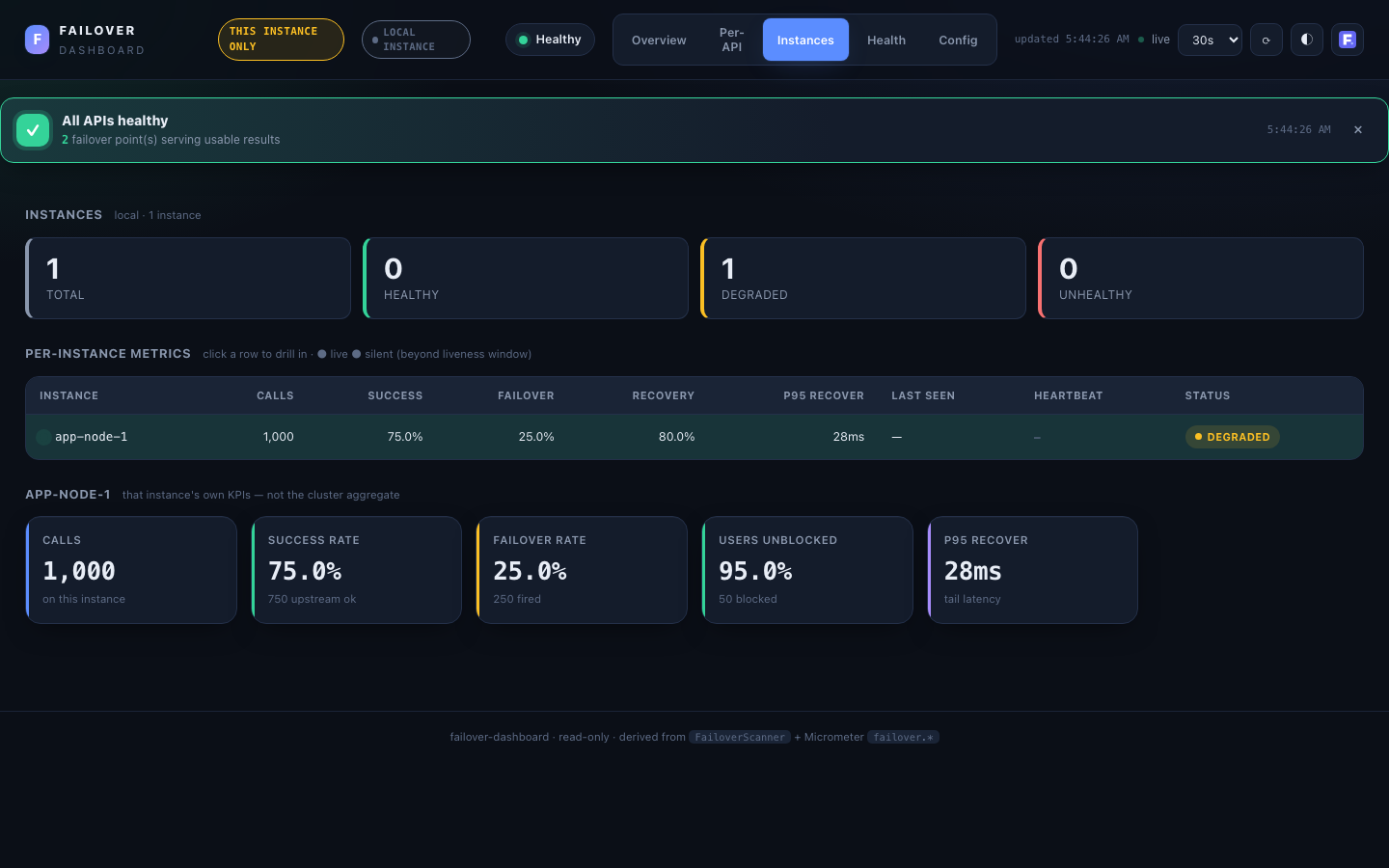
Cluster only — shown when the dashboard reads from a multi-instance source (shared-store or prometheus); hidden for local. Answers the first incident question: one bad node, or all of them?
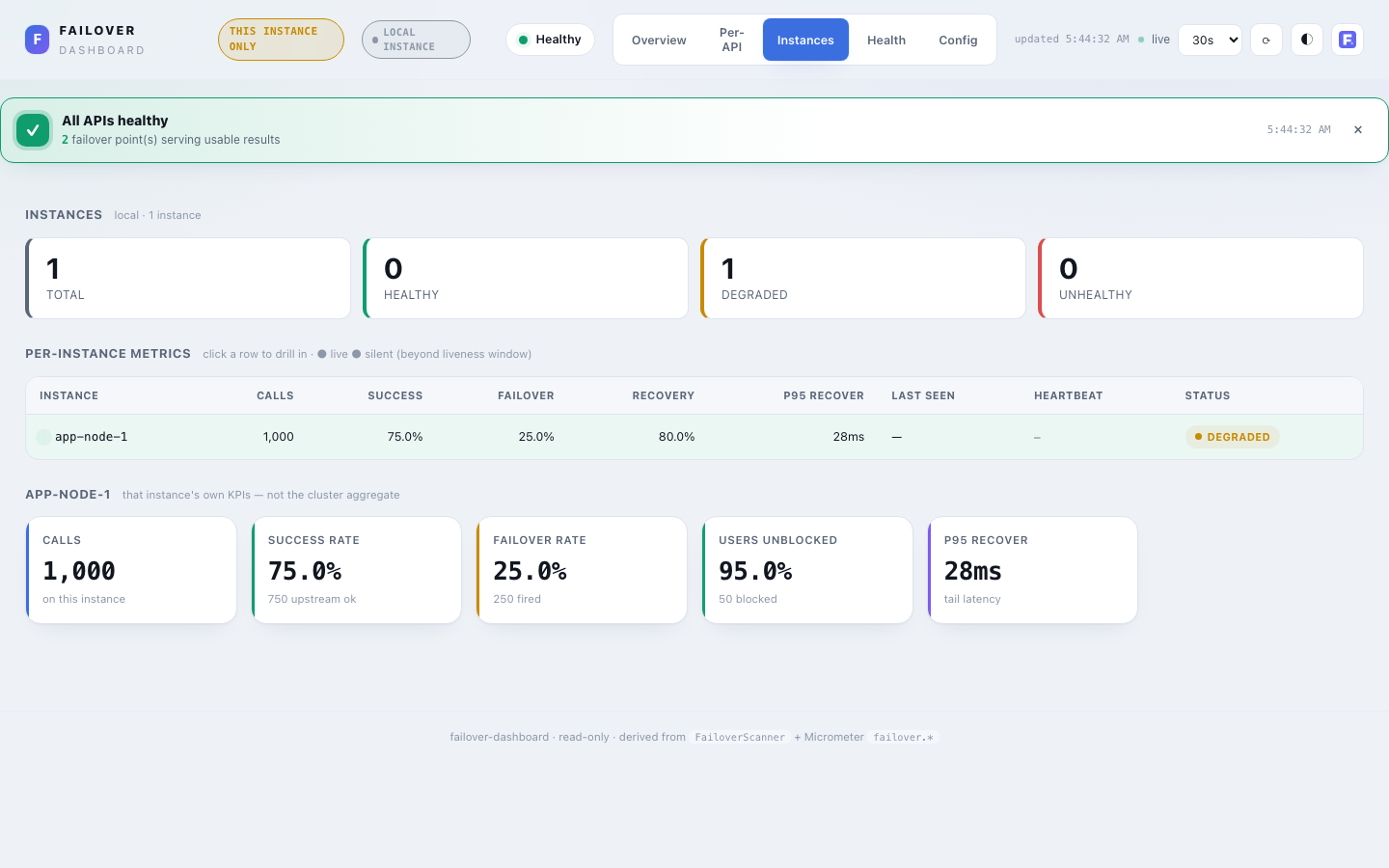
- Roll-up cards — Total · Reporting · Silent · Healthy · Degraded · Unhealthy. Silent = expected-but-not-reporting (beyond the liveness window in
shared-store). - Per-instance table — a row per instance: id, live/silent dot, calls, success / failover / recovery %, p95 recover, last-seen, and a status badge. Click a row to drill in.
- Drill-down — the selected instance's own KPIs (calls, success, failover, users-unblocked, p95) — not the cluster aggregate.
Data comes from MetricsSource.instances(): in shared-store from the per-instance snapshots the store already holds; in prometheus from sum by (name, instance) (failover_*) queries. In shared-store, instances unseen past instance-retention are retired from this tab (their counts remain in the cluster aggregate — see Instance churn).
Health¶
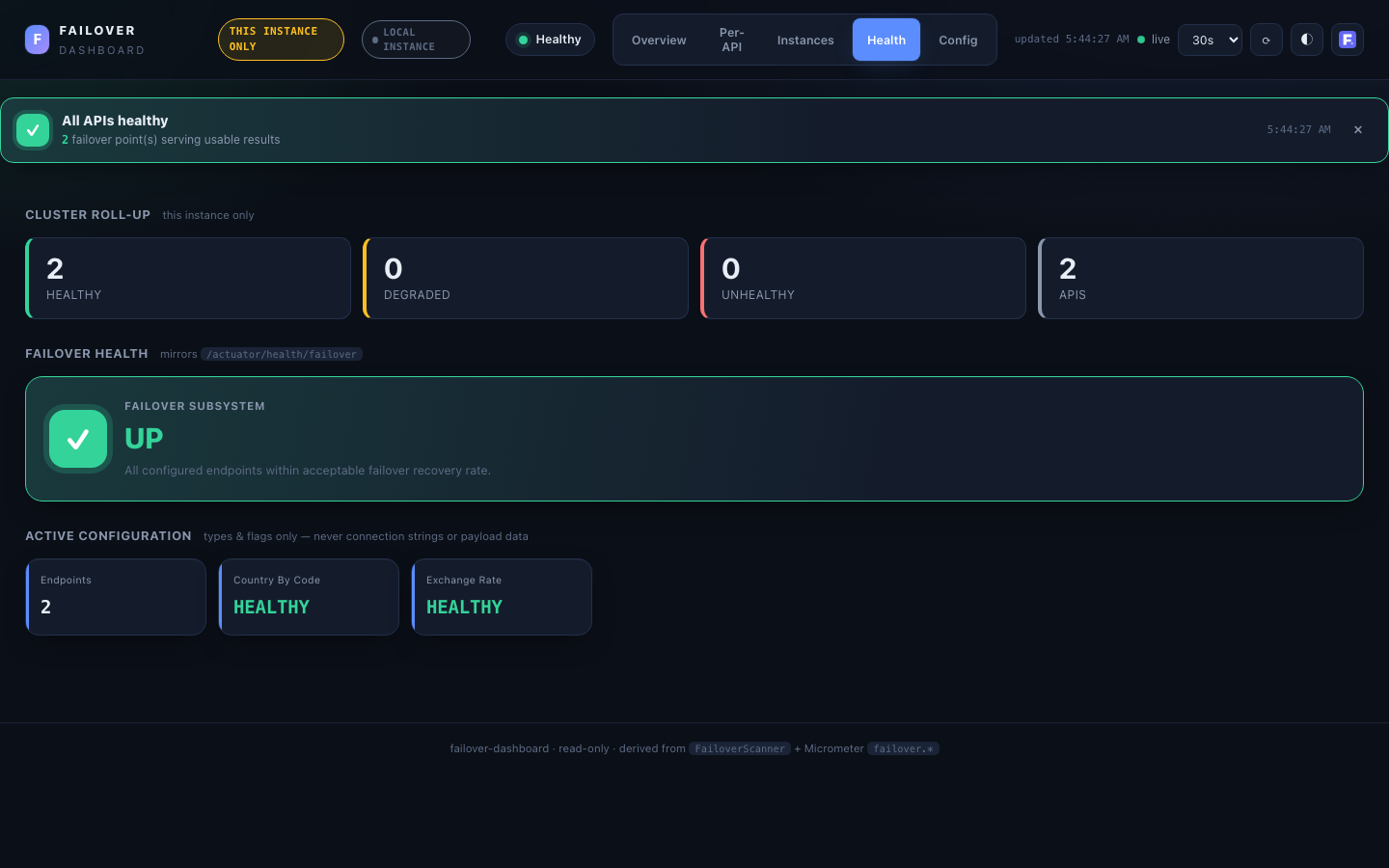
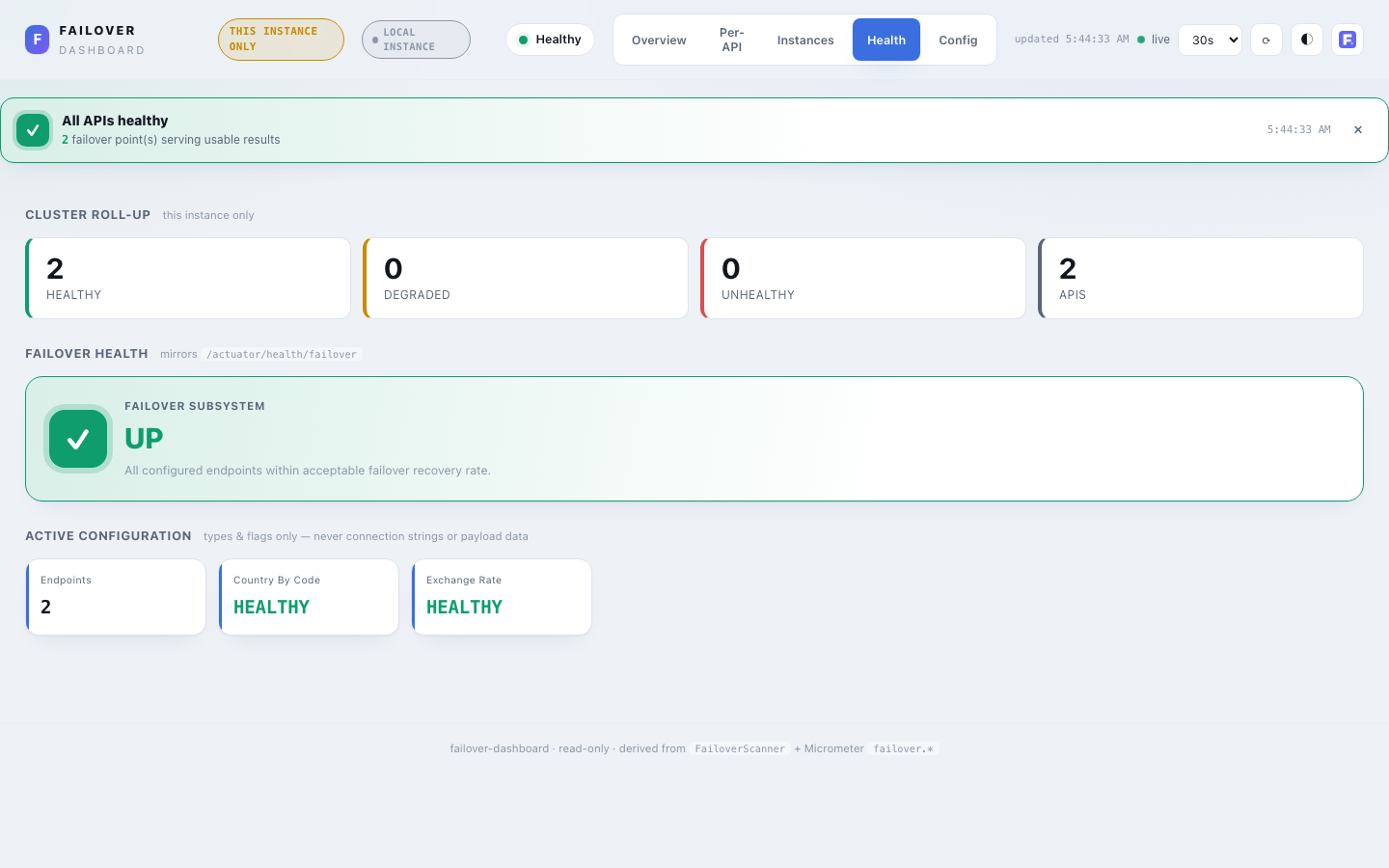
Actuator-style subsystem health, mirroring the /actuator/health/failover contributor.
- Cluster roll-up — healthy / degraded / unhealthy API counts + instances reporting, with a provenance line (local vs cluster aggregate). Cluster-wide via
MetricsSource.health()across whichever tier is active. - Status hero —
UP(at least one@Failoverregistered) orDOWN(none discovered — a misconfiguration signal). Two quick-glance metrics sit under the hero note: Upstream failing (how many endpoints have had at least one upstream failure) and Top upstream exception — both windowed (see below), so they surface even when every failure has been fully recovered and the hero itself still readsUP. - Active configuration — the global config rendered as small stat cards (registered failovers, type, store type, async, exception policy, scheduler…). Types and flags only — never credentials or connection strings (§9).
Upstream call health¶
One card per @Failover point, sorted worst-first, scored on the upstream call alone — recovery is deliberately not factored in. This exists to close a real blind spot: a healthyRate-based status (the hero above, the Per-API table, the banner) counts a fully-recovered call as healthy, so an endpoint whose upstream fails 100% of the time but is always served from cache reads as green everywhere else in the dashboard. A card here still flags it.
- Severity —
STABLE(no upstream failures),WATCH(up to 10% of calls failing upstream),FAILING(above 10%) — based onfailoverRatealone, nothealthyRate. - Composition bar — a 3-segment strip (fresh / recovered / blocked) showing what the last
health.sample-sizecalls actually looked like, derived from the windowed rates — no extra data fetched. - Sparkline — the windowed
failoverRateacross recent dashboard refreshes (client-accumulated; distinct from the composition bar, which is a snapshot of the current window rather than a trend over time). - Top exception — from
/api/metrics/exceptions(local source only). - Expiry hint — when an endpoint is masked (100% recovered so far), the card names the failover point's configured expiry (from
/api/config) and prompts notifying the upstream owner before that cache entry ages out and the call starts failing for real.
Both this view and the healthyRate used everywhere else in the dashboard are computed over a rolling window of the last failover.dashboard.health.sample-size calls per failover point (default 100), not the lifetime-cumulative total — see health.sample-size above. Without windowing, a cumulative rate never fully recovers from an old bad spell: a handful of errors from hours ago keep dragging an endpoint that has been fine for the last 10,000 calls into DEGRADED. The window is reconstructed server-side from counter deltas on every poll (no per-call event hook needed), so it works for any local-source deployment without extra instrumentation. Cluster-aware sources (prometheus, shared-store) do not yet support this window — /api/health/upstream returns an empty map for them and the card falls back to the cumulative failoverRate.
Config¶
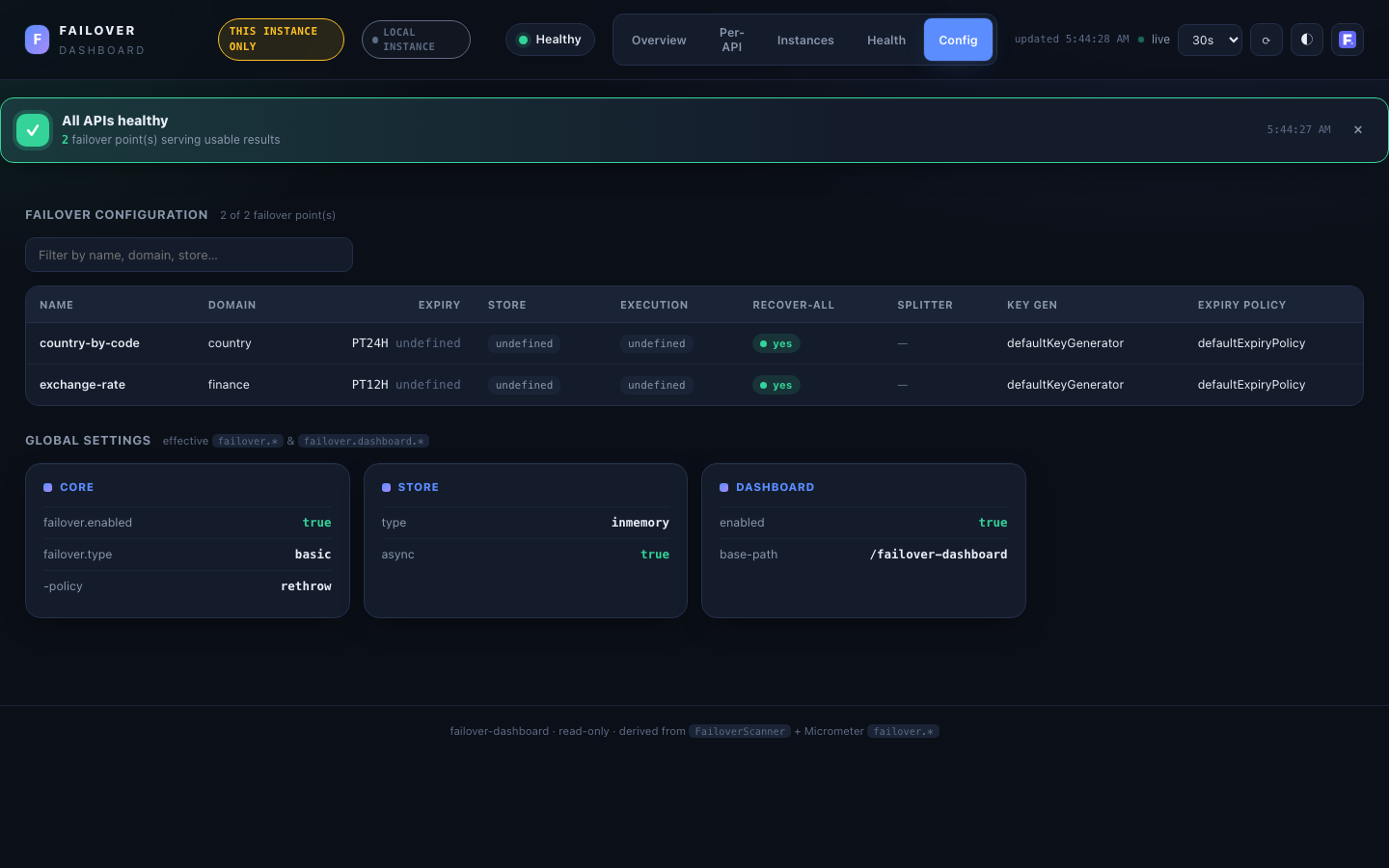
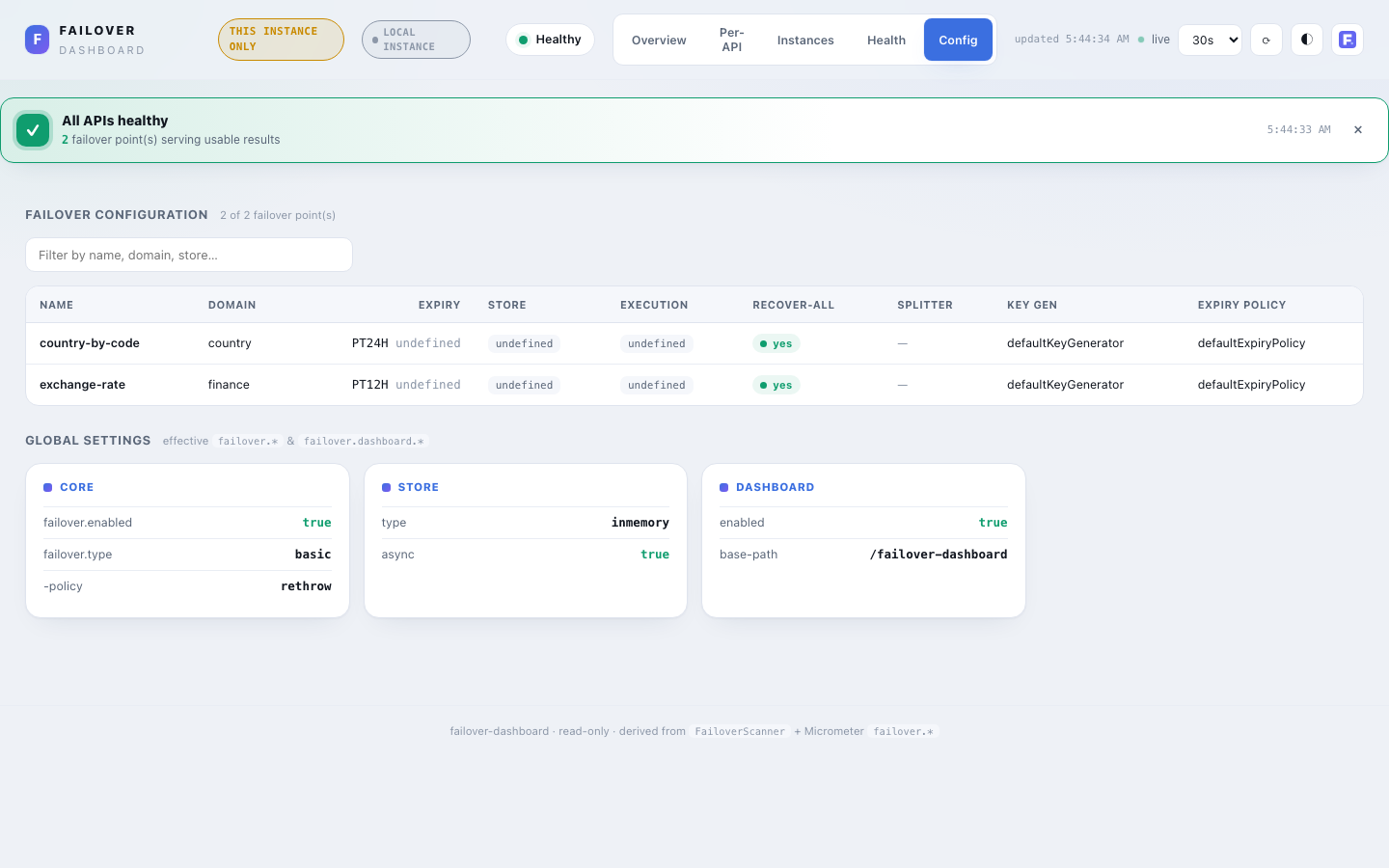
- Failover configuration — a sortable, filterable table of every
@Failoverpoint: name, domain, expiry, store, execution, recover-all, splitter, key generator, expiry policy. Empty per-annotation overrides render asdefault. - Global settings — the effective
failover.*/failover.dashboard.*settings grouped into panels (Core / Store / Scatter / Scheduler / Dashboard). Types, flags, crons, thresholds and paths only.
KPIs — Derived, Not Measured¶
Every KPI is derived from counters that already exist (failover.store.total, failover.recovery.outcome.total, failover.recover.total). Per API, let S = stored upstream successes and F = recovered + not-recovered + error:
| KPI | Formula | Meaning |
|---|---|---|
| Success rate | S / (S+F) | upstream healthy → live value stored |
| Failover rate | F / (S+F) | upstream failed → failover flow started |
| Recovery rate | recovered / F | failover served a stored, non-expired value |
| Non-recovery rate | (not_recovered + error) / F | failover found nothing usable |
| Health (healthy-served) | (S + recovered) / (S+F) | caller got a usable result (live or recovered) |
Zero denominators yield 0, never NaN. Health is classified HEALTHY / DEGRADED / UNHEALTHY against configurable thresholds.
Three further operational signals are surfaced from existing meters (still no new instrumentation):
| Signal | Source meter | Why it matters |
|---|---|---|
| Async write failures | failover.store.async.failed | Async store writes that threw inside the executor — failover data was not persisted. Shown as a KPI, a red per-API table column, and a loud banner when non-zero. Alert on any increase. |
| Latency (mean / max) | failover.operation.duration (timer) | Wall time of the store and recover paths, per API. Mean + max only — the timer has no percentile histogram, so p95/p99 are intentionally absent. |
| Top exception types | failover.exception.total | Which upstream exception types trigger failover most — quick root-cause triage. |
Security¶
The dashboard surfaces internal operational data, so the access gate is not relaxed by the convenience defaults: every request is denied unless explicitly allowed, at every layer, from the first line of config.
Security model at a glance¶
Two independent gates protect the dashboard, plus one narrowing filter that isn't a gate at all — keeping these three straight is the key to reasoning about who can reach what:
                         ┌─────────────────────────────────────────────┐
  Browser / API caller   │  1. Main gate — dashboardSecurityFilterChain │
  GET  base-path/**  ───►│     security.type: ROLE | AUTHORITY |        │───► UI + read API
                         │     EXPRESSION. Who may VIEW the dashboard.  │
                         └─────────────────────────────────────────────┘

                         ┌─────────────────────────────────────────────┐
  Peer instance          │  2. Ingest gate — dashboardIngest*FilterChain│
  POST base-path/api/    │     Basic | OAuth2 | Open. Who may PUSH a    │───► SnapshotStore /
       cluster/snapshot  │     snapshot/heartbeat. Independent of #1 —  │     HeartbeatStore
       cluster/heartbeat │     evaluated first, main gate never runs.   │
  ───────────────────────┴─────────────────────────────────────────────┘

                         ┌─────────────────────────────────────────────┐
  (after gate 1 or 2     │  3. exposure.include — NOT a security gate   │
   already let it in)    │     Narrows which already-authorized reads   │───► 404 if narrowed out
                         │     are served. Never applies to ingest.     │
                         └─────────────────────────────────────────────┘
- Gate 1 — who may view the dashboard (UI +
GETread API): Main dashboard access control below. - Gate 2 — who may push a peer snapshot/heartbeat (
cluster.mode=shared-storeonly): Peer ingest access control below. Fully independent of gate 1 — a peer never needs UI credentials, and a UI viewer never needs ingest credentials. - Not a gate —
exposure.include: narrows which already-authorized read endpoints are served; explained inexposure.includevs. ingest access control below.
Deployment topology: two instances, two different security needs
failover-dashboard is meant to run as its own deployment, separate from the @Failover-instrumented services it monitors — the dashboard reads metrics from peers over the network (cluster.mode=shared-store push, or cluster.mode=prometheus pull). Gate 1 protects that dashboard instance; gate 2 protects it from peer instances pushing data in. Running the dashboard in the same JVM as @Failover business logic (cluster.mode=local) is a supported but rare exception — typically a single-instance app or local dev — not the primary scenario. See Distributed Deployment: Scenarios below for the full picture, and Picking a mode to choose between local / shared-store / prometheus.
Fail-closed by construction¶
- Spring Security present (bundled by the starter, the expected case): gate 1 is always registered — there is no configuration that removes it.
security.allow-insecure=trueis a narrower escape hatch (below), not an absence of the gate. - Spring Security absent from the classpath: the context refuses to start — enabling the dashboard without any way to gate it is treated as a startup error, not a silent open door. The only way past this is the explicit
allow-insecure=trueescape hatch (dev / trusted-network only). - The
allow-insecureescape hatches are refused under theprodprofile — bothsecurity.allow-insecure(gate 1) andcluster.snapshot.allow-insecure-ingest(gate 2). This holds regardless of whether Spring Security is present or absent on the classpath: the context fails fast at startup rather than silently running unsecured in production (I-14). - Never a soft-fail: every gate either explicitly permits or the request is rejected — there is no code path where a misconfiguration is treated as "allow".
Should the consuming application secure these endpoints?¶
Short answer: yes, in every scenario except local development and CI. There is no supported production topology where either gate is left open. The table below is the concrete "which scenario am I in, what do I turn on" reference:
| Scenario | Gate 1 — main UI/API | Gate 2 — peer ingest (shared-store only) |
|---|---|---|
Production — any topology, any cluster.mode | Must secure. security.type=ROLE\|AUTHORITY\|EXPRESSION with real credentials/IdP integration. allow-insecure=true is refused outright if spring.profiles.active includes prod — the app fails to start. | Must secure, if cluster.mode=shared-store is used at all. snapshot.username+password (Basic) or snapshot.oauth2-client-registration-id (OAuth2). allow-insecure-ingest=true is likewise refused under prod. |
| Staging / pre-prod that mirrors production | Secure it the same way as production — staging environments are routinely reachable from wider networks than assumed. | Same reasoning — secure it. |
Local development (localhost, no shared network) | allow-insecure=true is fine — nothing outside your machine can reach it, and it's not the prod profile so the guard doesn't fire. | allow-insecure-ingest=true is fine, same reasoning. |
| CI / integration tests | allow-insecure=true is the norm — tests assert dashboard behavior without wiring a full auth stack. See the integration tests in failover-dashboard for the pattern. | allow-insecure-ingest=true, same reasoning. |
Trusted internal network (e.g. a Kubernetes namespace with NetworkPolicy denying external ingress, peers and dashboard both inside it) | Still recommend securing it — it's cheap (a role check) and defends against lateral movement within the trusted zone, which network policy alone doesn't stop. If you accept the risk, allow-insecure=true works outside the prod profile. | allow-insecure-ingest=true is the one place a reasoned exception is common — service-to-service traffic fully inside a network boundary you control. Still gated by the same prod-profile refusal as a backstop against this reasoning being applied to an internet-facing deployment by mistake. |
Single-JVM co-location (cluster.mode=local, dashboard and @Failover in the same app — the rare topology, see Security model at a glance above) | Must secure, same as any production app — this is still an HTTP endpoint on the same app, reachable by whatever can reach the app. | N/A — no ingest endpoint exists in local mode; there's nothing to secure or leave open. |
How to secure gate 1 (production checklist):
- Keep
spring-boot-starter-security(or equivalent) on the classpath — the starter brings it in by default. - Pick a
security.type—AUTHORITY(default) for permission-based systems,ROLEfor RBAC,EXPRESSIONfor composite rules. See Main dashboard access control below for the config and examples for each. - Wire real authentication (the dashboard doesn't provide a login mechanism — it authorizes whatever
Authenticationyour app's Spring Security setup already produces: form login, SSO, an upstream gateway injecting a principal, etc.). - Leave
security.allow-insecureat its defaultfalse. Never set ittrueunder theprodprofile — the context will refuse to start if you do, by design.
How to secure gate 2 (production checklist, cluster.mode=shared-store only):
- Pick one:
snapshot.username+snapshot.password(Basic, no IdP needed) orsnapshot.oauth2-client-registration-id(OAuth2 Bearer, recommended when an IdP is already in play). See Peer ingest access control below for both, with peer-side and dashboard-side config pairs. - Leave
cluster.snapshot.allow-insecure-ingestat its defaultfalse. Sameprod-profile refusal as gate 1. - If you're on
cluster.mode=localorcluster.mode=prometheus, there's no ingest endpoint — this checklist doesn't apply; skip straight to gate 1.
Main dashboard access control¶
Three authorization strategies are supported, selected via security.type:
security.type=ROLE— role-based access control. CheckshasRole(security.role). Suitable when roles are the primary grouping mechanism. Example:role=ADMIN, and the user must have theADMINrole.security.type=AUTHORITY(default) — authority/permission-based access control. CheckshasAuthority(security.authority). Suitable for fine-grained permission models. Example:authority=FAILOVER_ADMIN, and the user must have theFAILOVER_ADMINauthority.security.type=EXPRESSION— evaluates a SpEL web-security expression via Spring Security'sWebExpressionAuthorizationManager. Suitable for composite rules (e.g. "role OR authority", IP allow-listing, custom bean-backed checks) that don't fit a single role or authority check. See Expression-based access control below for a full walkthrough and examples.
ROLE and AUTHORITY are both plain Spring Security concepts; the choice depends on your authentication scheme. ROLE is prefixed internally by Spring Security; AUTHORITY is not. So a user with role ADMIN has the authority ROLE_ADMIN. When using type=ROLE, set security.role to the name without the ROLE_ prefix (e.g., ADMIN); Spring Security adds it automatically. When using type=AUTHORITY, use the full authority string (e.g., FAILOVER_ADMIN, or ROLE_ADMIN if your authorities include the prefix).
failover:
  dashboard:
    security:
      type: ROLE
      role: ADMIN
      # Users with role ADMIN can access the dashboard
failover:
  dashboard:
    security:
      type: AUTHORITY
      authority: FAILOVER_ADMIN
      # Users with authority FAILOVER_ADMIN can access the dashboard
failover:
  dashboard:
    security:
      type: EXPRESSION
      expression: "hasAnyRole('ADMIN') or hasAnyAuthority('WRITE_PRIVILEGE')"
      # Users with role ADMIN, OR authority WRITE_PRIVILEGE, can access the dashboard
Authentication mechanism: HTTP Basic, OAuth2 login, OAuth2 resource server, or bring your own¶
security.type (above) controls authorization — who's allowed in. It's independent of authentication — how someone proves who they are — which is a separate choice, and one of four mechanisms, tried in this priority order (each backs off cleanly when a higher-priority one is active):
- A custom
DashboardAuthenticationConfigurerbean — bring any mechanism the other three don't cover. - OAuth2 login — a browser-native SSO redirect flow (session-based).
- OAuth2 resource server — stateless JWT Bearer validation, for SSO terminated upstream of the dashboard.
- HTTP Basic (default) — a native browser credential prompt, checked against whatever
UserDetailsService/AuthenticationProvideryour app supplies.
OAuth2 login — browser redirects to an IdP (GitHub, Okta, Azure AD, your own OIDC provider, etc.) for a proper login page, session, and logout, instead of a native Basic-Auth prompt. Activate it by setting security.oauth2-client-registration-id to a registration under the standard spring.security.oauth2.client.registration.<id> map:
spring:
  security:
    oauth2:
      client:
        registration:
          github:
            client-id: <github-oauth-app-id>
            client-secret: <github-oauth-app-secret>
            authorization-grant-type: authorization_code
            scope: read:user

failover:
  dashboard:
    security:
      type: ROLE                            # or AUTHORITY / EXPRESSION — unchanged
      role: ADMIN
      oauth2-client-registration-id: github  # switches httpBasic() → oauth2Login()
OAuth2 resource server — validates a JWT Authorization: Bearer header on every request, including the initial page load. No session, no login page — this only works when whatever sits in front of the dashboard (an API gateway, service-mesh sidecar, or reverse proxy such as oauth2-proxy) has already done SSO and forwards a validated token on the browser's behalf. A bare browser navigating straight to the dashboard has no token to attach and will just 401 — use OAuth2 login instead for that case. Activate with security.oauth2-resource-server=true plus the standard Spring Boot resource-server properties:
spring:
  security:
    oauth2:
      resourceserver:
        jwt:
          issuer-uri: https://idp.example.com/realms/internal   # or jwk-set-uri

failover:
  dashboard:
    security:
      type: AUTHORITY
      authority: FAILOVER_ADMIN
      oauth2-resource-server: true   # switches httpBasic() → oauth2ResourceServer().jwt()
Whichever mechanism you pick, security.type/role/authority/expression still decide who's authorized — only the authentication mechanism changes. OAuth2 login requires spring-security-oauth2-client on the classpath; OAuth2 resource server requires spring-security-oauth2-resource-server — both already optional dependencies of failover-dashboard.
Bring your own mechanism: DashboardAuthenticationConfigurer¶
The three mechanisms above cover HTTP Basic, browser SSO, and gateway-forwarded JWTs — but not everything. Declare a DashboardAuthenticationConfigurer bean to plug in any other mechanism — a trusted-header identity forwarded by a reverse proxy (oauth2-proxy, Envoy), SAML, mTLS-derived principals, an existing enterprise AuthenticationProvider, or a shop whose only OAuth2 registration is client_credentials and wants the dashboard to sit entirely behind its own gateway's authentication — without re-implementing the securityMatcher(base-path + "/**"), the security.type/role/authority/expression authorization check, or the 403 error handling every built-in mechanism already shares:
@Configuration
public class DashboardAuthConfig {

    @Bean
    public DashboardAuthenticationConfigurer dashboardAuthenticationConfigurer() {
        return (http, context) -> http.addFilterBefore(
                new TrustedHeaderAuthenticationFilter("X-Authenticated-User", "X-Authenticated-Roles"),
                UsernamePasswordAuthenticationFilter.class);
    }
}
configure(http, context) is called after securityMatcher and authorizeHttpRequests are already applied to http — add only the authentication step (http.oauth2ResourceServer(...), http.addFilterBefore(...), http.x509(...), etc.); don't call securityMatcher or authorizeHttpRequests again. A DashboardAuthenticationConfigurer bean takes priority over every built-in mechanism — including OAuth2 login and OAuth2 resource server, if either is also configured — and, like both of those, is exempt from the "fail-fast if HTTP Basic has no way to authenticate anyone" check below (it authenticates on its own terms).
Map IdP claims to your role/authority — or every login will be denied
An OAuth2/OIDC login doesn't automatically grant FAILOVER_ADMIN or any other configured role/authority — GitHub, Okta, etc. hand back their own scopes (SCOPE_read:user, OAUTH2_USER, ...), which won't match hasRole('ADMIN')/hasAuthority('FAILOVER_ADMIN') by default. Supply a standard Spring Security GrantedAuthoritiesMapper bean to map IdP claims/scopes onto the role or authority security.type checks — this is a normal Spring Security extension point, not something the dashboard invents. Without one, every successfully-authenticated OAuth2 user is still denied (403, not 401 — authentication succeeded, authorization didn't).
Not the same property as the peer-ingest OAuth2 setting
security.oauth2-client-registration-id (above) is for browsers logging into the UI — a human, authorization_code grant. It is a different property from cluster.snapshot.oauth2-client-registration-id (see Peer ingest access control below), which is for peer instances pushing snapshots — machine-to-machine, client_credentials grant. Both reference registrations under the same spring.security.oauth2.client.registration.<id> map, but they identify different registrations for different purposes — there's no reason they'd share a value, and most deployments that use both will point them at two entirely different IdP configurations (or even different IdPs).
Fail-fast if HTTP Basic has no way to authenticate anyone
With the default HTTP Basic mechanism and security.type=ROLE or AUTHORITY (either requires a real, non-anonymous authenticated principal), the dashboard fails to start unless a UserDetailsService or AuthenticationProvider bean exists somewhere in the app — without one, every credential 401s and there is no correct password to find. This is deliberately fail-fast rather than a silent dead end: define one of those beans (spring.security.user.name/password is enough for a quick dev user), switch to OAuth2 login or OAuth2 resource server above, declare a DashboardAuthenticationConfigurer bean, override dashboardSecurityFilterChain with your own mechanism, or set security.allow-insecure=true for trusted-network/dev use. security.type=EXPRESSION only warns instead of failing, since a SpEL expression might legitimately grant access without real authentication (e.g. an IP-based rule) — something that can't be determined statically at startup. OAuth2 login, OAuth2 resource server, and a custom DashboardAuthenticationConfigurer are all exempt from this check — each authenticates on its own terms and needs no UserDetailsService.
Specific 403 messages, not Spring Security's blank default
When someone authenticates fine but lacks the required role/authority, the main gate returns a 403 with a body naming exactly what's missing — {"error":"Forbidden","message":"Authorization failed: missing required role 'FAILOVER_ADMIN'"} (or missing required authority '...'; denied by the configured access expression for type=EXPRESSION, since a SpEL failure reason can't be introspected generically) — instead of Spring Security's default blank 403. The authenticated principal's name and actual authorities are logged server-side (DashboardAccessDeniedHandler, INFO level) for operator diagnosis, but deliberately left out of the client-facing body. Declare your own DashboardAccessDeniedHandler (or a plain Spring Security AccessDeniedHandler) bean to override.
If your app has endpoints outside base-path — you need your own SecurityFilterChain too¶
This isn't specific to the dashboard — it's how Spring Security works whenever more than one SecurityFilterChain bean exists. Whichever of dashboardSecurityFilterChain, dashboardOAuth2SecurityFilterChain, dashboardOAuth2ResourceServerFilterChain, or dashboardCustomAuthFilterChain is active only ever calls securityMatcher(base-path + "/**"). If your app has its own endpoints outside that namespace (/, /api/**, /actuator/health, /error, and — with OAuth2 login — the redirect endpoints Spring Security itself exposes like /oauth2/authorization/<registration-id>), none of them match the dashboard's chain, and no other chain exists unless you add one. Spring Security's own catch-all default chain only auto-registers when no SecurityFilterChain bean is present anywhere in the app — the dashboard's own bean already counts, so that fallback never kicks in.
Unmatched here doesn't mean "permitted" — it means not filtered at all: the request never passes through Spring Security, so SecurityContextHolder is never populated (an endpoint like /api/me reading the current principal sees nothing), and /oauth2/authorization/<registration-id> — not a real MVC endpoint, just a path OAuth2AuthorizationRequestRedirectFilter intercepts — 404s as an unmapped static resource instead of triggering the IdP redirect, since that filter only runs inside whichever chain configured oauth2Login().
Fix: add your own SecurityFilterChain bean covering everything else. The same GrantedAuthoritiesMapper bean (above) applies automatically to it too, with no extra wiring — Spring Security's OAuth2LoginConfigurer looks up any GrantedAuthoritiesMapper bean from the application context on its own.
@Configuration
public class SecurityConfig {

    @Bean
    public SecurityFilterChain securityFilterChain(HttpSecurity http) throws Exception {
        http.authorizeHttpRequests(auth -> auth
                        .requestMatchers("/actuator/health", "/api/info", "/error").permitAll()
                        .anyRequest().authenticated())
                .oauth2Login(oauth2 -> oauth2.defaultSuccessUrl("/failover-dashboard", true));
        return http.build();
    }

    // GitHub hands back its own scopes, never FAILOVER_ADMIN — map it explicitly.
    // (Optional here since Spring Security auto-detects this bean for oauth2Login() chains anyway —
    // shown for clarity. A real deployment would check org/team membership, not "any GitHub user".)
    @Bean
    public GrantedAuthoritiesMapper failoverAdminAuthoritiesMapper() {
        return authorities -> {
            Set<GrantedAuthority> mapped = new HashSet<>(authorities);
            for (GrantedAuthority authority : authorities) {
                if (authority instanceof OAuth2UserAuthority || authority instanceof OidcUserAuthority) {
                    mapped.add(new SimpleGrantedAuthority("ROLE_FAILOVER_ADMIN"));
                    break;
                }
            }
            return mapped;
        };
    }
}
If the dashboard is the only thing your app serves (no other endpoints, Scenario E — Standalone dashboard), none of this applies — there's nothing outside base-path for a second chain to cover.
Expression-based access control¶
security.type=EXPRESSION hands security.expression straight to Spring Security's WebExpressionAuthorizationManager, which parses it as a Spring Expression Language (SpEL) authorization expression — the same language and function set used by @PreAuthorize and the classic .access("...") DSL. Use it whenever a single hasRole(...) or hasAuthority(...) check isn't enough.
Requirements:
security.expressionmust be set and non-blank whentype=EXPRESSION. If it is blank, the context fails fast at startup withfailover.dashboard.security.expression must be set (non-blank) when failover.dashboard.security.type=EXPRESSION.security.role/security.authorityare ignored whentype=EXPRESSION— the expression is the single source of truth for the rule.- The expression is evaluated once per request against the current
Authentication— same runtime semantics as any other Spring Security web-expression, including the standard built-in functions below.
Built-in expression functions available (non-exhaustive):
| Function | Meaning |
|---|---|
hasRole('X') | Current user has role X (internally checked as authority ROLE_X). |
hasAnyRole('X','Y',...) | Current user has at least one of the listed roles. |
hasAuthority('X') | Current user has authority X (exact string, no prefix). |
hasAnyAuthority('X','Y',...) | Current user has at least one of the listed authorities. |
isAuthenticated() | Current user is authenticated (not anonymous). |
isFullyAuthenticated() | Authenticated via credentials in this session — not "remember-me". |
isAnonymous() | Current user is the anonymous (unauthenticated) principal. |
permitAll / denyAll | Unconditional allow / deny (rarely needed here — use allow-insecure for permit-all instead). |
hasIpAddress('a.b.c.d/mask') | Caller's remote address matches the given IP / CIDR range. |
authentication | The current Authentication object — access .name, .principal, .authorities, etc. |
principal | The current principal (often a UserDetails) — access custom fields. |
@beanName.method(...) | Delegates to a Spring bean's method for custom, arbitrarily complex logic. |
Example expressions:
security:
  type: EXPRESSION
  expression: "hasAnyRole('ADMIN') or hasAnyAuthority('WRITE_PRIVILEGE')"
security:
  type: EXPRESSION
  expression: "hasAnyAuthority('FAILOVER_ADMIN', 'FAILOVER_READ')"
security:
  type: EXPRESSION
  expression: "hasRole('ADMIN') and hasAuthority('FAILOVER_ADMIN')"
security:
  type: EXPRESSION
  expression: "isAuthenticated()"
security:
  type: EXPRESSION
  expression: "hasRole('ADMIN') and hasIpAddress('10.0.0.0/8')"
security:
  type: EXPRESSION
  expression: "!isAnonymous() and hasRole('ADMIN')"
security:
  type: EXPRESSION
  expression: "authentication.name == 'ops-svc-account'"
security:
  type: EXPRESSION
  expression: "@dashboardAccessPolicy.check(authentication)"
@Component("dashboardAccessPolicy")
public class DashboardAccessPolicy {
    public boolean check(Authentication authentication) {
        // arbitrary Java logic: LDAP group lookup, feature flag, business hours, etc.
        return authentication.getAuthorities().stream()
                .anyMatch(a -> a.getAuthority().equals("FAILOVER_ADMIN"));
    }
}
Prefer the simplest option that fits
Reach for EXPRESSION only when ROLE/AUTHORITY alone can't express the rule. A single role or authority check is easier to reason about and to audit than a SpEL string. Composite rules (OR/AND across roles and authorities, IP scoping, custom bean logic) are exactly what EXPRESSION is for.
Implementation¶
- Spring Security present (bundled by the starter): the module contributes a
SecurityFilterChainscoped tobase-path/**, applying the role, authority, or expression check based onsecurity.type. Override it with your owndashboardSecurityFilterChainbean, or supply your ownFailoverSecurityProviderbean to customize just the authorization rule while keeping the rest of the chain (seeFailoverSecurityProviderbelow). - Spring Security absent: the context fails fast at startup — unless
failover.dashboard.security.allow-insecure=true, which starts unsecured with a loud repeatedWARN( trusted-network / dev only). Theallow-insecureescape hatch is refused outright when theprodprofile is active : it can never silently disable the access gate in production.
A strict, static-only Content-Security-Policy is applied to every dashboard response (no remote or inline scripts; Chart.js is vendored). The API is read-only — no endpoint mutates state. Only annotation metadata and aggregate counts are exposed — never payload data, keys, credentials, or connection strings.
// When using type=ROLE
http.authorizeHttpRequests(a -> a
        .requestMatchers("/failover-dashboard/**").hasRole("ADMIN"));

// When using type=AUTHORITY
http.authorizeHttpRequests(a -> a
        .requestMatchers("/failover-dashboard/**").hasAuthority("FAILOVER_ADMIN"));

// When using type=EXPRESSION
http.authorizeHttpRequests(a -> a
        .requestMatchers("/failover-dashboard/**")
        .access(new WebExpressionAuthorizationManager("hasAnyRole('ADMIN') or hasAnyAuthority('WRITE_PRIVILEGE')")));
Custom FailoverSecurityProvider¶
For finer control than a config property (e.g. reading the rule from an external policy service, or applying different logic per request beyond what SpEL conveniently expresses), declare your own FailoverSecurityProvider bean — it's an @ConditionalOnMissingBean extension point, so declaring one replaces DefaultFailoverSecurityProvider without needing to write a whole SecurityFilterChain:
@Bean
public FailoverSecurityProvider failoverSecurityProvider() {
    return (auth, context) -> {
        // context.basePath() — the dashboard's base path (informational; matching is
        //                       already scoped to base-path/** by the caller — don't re-match it here)
        // context.security() — the bound DashboardProperties.Security (type/role/authority/expression/allowInsecure)
        auth.anyRequest().access(new WebExpressionAuthorizationManager(
                "hasRole('ADMIN') or @myPolicyBean.allow(authentication)"));
    };
}
Peer ingest access control¶
The peer ingest endpoints — POST /api/cluster/snapshot (metrics) and POST /api/cluster/heartbeat (liveness, opt-in) — receive peer pushes and share one dedicated gate, secured three ways. Choose one; the dashboard activates the matching filter chain automatically.
Option 1 — HTTP Basic Auth¶
When to use: peers can't use OAuth2; a shared secret is acceptable; no IdP in the infra.
Peer                                  Dashboard
 │──► POST /api/cluster/snapshot           │
 │    Authorization: Basic base64(u:p)     │
 │                              dashboardIngestBasicFilterChain
 │                                         │── InMemoryUserDetailsManager({noop}pwd)
 │                                         │── 401 if credentials mismatch
 │◄── 200 OK ──────────────────────────────│
Dashboard properties:
failover:
  dashboard:
    cluster:
      snapshot:
        username: ingest-user   # activates dashboardIngestBasicFilterChain
        password: s3cr3t        # plain text — {noop} applied internally on the dashboard
Peer properties:
failover:
  dashboard:
    cluster:
      snapshot:
        publish-url: http://dashboard:8080/failover-dashboard
        username: ingest-user   # must match dashboard's snapshot.username
        password: s3cr3t        # plain text — sent as-is in Authorization: Basic
Option 2 — OAuth2 Bearer (Recommended when IdP is available)¶
When to use: peers already have OAuth2AuthorizedClientManager; IdP manages tokens; no shared secrets; automatic token rotation.
Peer                  IdP                     Dashboard
 │──► POST /token ───►│                           │
 │◄── Bearer JWT ─────│                           │
 │──► POST /api/cluster/snapshot ────────────────►│
 │    Authorization: Bearer <jwt>    dashboardIngestOAuth2FilterChain
 │                                               │── jwt().issuerUri validation
 │                                               │── 401 if token invalid / expired
 │◄── 200 OK ────────────────────────────────────│
Dashboard properties:
spring:
  security:
    oauth2:
      resourceserver:
        jwt:
          issuer-uri: https://idp.example.com/realms/myrealm
# No snapshot.username needed — OAuth2 chain activates via classpath dep
Dashboard pom.xml additions: spring-security-oauth2-resource-server + spring-security-oauth2-jose.
Peer properties:
spring:
  security:
    oauth2:
      client:
        registration:
          failover-dashboard:
            client-id: failover-peer
            client-secret: <secret>
            authorization-grant-type: client_credentials
            scope: failover:ingest
        provider:
          my-idp:
            token-uri: https://idp.example.com/realms/myrealm/protocol/openid-connect/token

failover:
  dashboard:
    cluster:
      snapshot:
        publish-url: http://dashboard:8080/failover-dashboard
        oauth2-client-registration-id: failover-dashboard
Peer pom.xml addition: spring-security-oauth2-client.
Option 3 — No Auth / Open Ingest (Dev / Trusted Networks Only)¶
When to use: development, or peers and dashboard share an isolated, trusted network. Never production without network controls.
Dashboard properties:
failover:
  dashboard:
    cluster:
      snapshot:
        allow-insecure-ingest: true   # ⚠ logs WARN at startup; refused under 'prod' profile
Peer properties:
failover:
  dashboard:
    cluster:
      snapshot:
        publish-url: http://dashboard:8080/failover-dashboard
        allow-insecure-ingest: true   # suppresses the publisher-side no-auth startup WARN
        # no username / password / oauth2 needed
Without allow-insecure-ingest: true on the peer, the publisher logs a startup WARN on every peer that no auth is configured — even when the open ingest is intentional. Set this flag to acknowledge the insecure choice and silence the warn.
Auth Priority Summary¶
| Priority | Active when | Filter chain (dashboard) | Publisher sends |
|---|---|---|---|
| 1 — OAuth2 Bearer | spring-security-oauth2-resource-server on dashboard classpath | dashboardIngestOAuth2FilterChain @Order(-10) | Authorization: Bearer <jwt> |
| 2 — Basic Auth | snapshot.username set on dashboard; OAuth2 chain absent | dashboardIngestBasicFilterChain @Order(-10) | Authorization: Basic base64(u:p) |
| 3 — Open | snapshot.allow-insecure-ingest: true on dashboard; both above absent | dashboardIngestOpenFilterChain @Order(-10) (permit-all + WARN) | (none) — set allow-insecure-ingest: true on peer too to suppress the publisher-side WARN |
OAuth2 always wins when both OAuth2 and Basic are configured. The dashboard's main UI/API filter chain (dashboardSecurityFilterChain) operates at @Order(0) and is not affected by the ingest chain.
exposure.include vs. ingest access control¶
A request to POST /api/cluster/snapshot passes through two independent gates, in this order — and it's important not to conflate them when reasoning about "who can push a snapshot":
Peer ──► POST /api/cluster/snapshot
           │
           ▼
   1. Spring Security filter chain (authentication / authorization)
      One of dashboardIngestOAuth2FilterChain | dashboardIngestBasicFilterChain |
      dashboardIngestOpenFilterChain — @Order(-10), matches the ingest path first,
      so the main dashboardSecurityFilterChain (@Order(0), UI/API role check) is
      never consulted for this path. Rejects with 401 on bad/missing credentials.
           │ authenticated / permitted
           ▼
   2. DashboardExposureInterceptor (Spring MVC HandlerInterceptor)
      Runs after Security has already let the request through. Enforces
      exposure.include on read endpoints — config / failover-health / metrics /
      health / cluster / instances. The ClusterSnapshotController handler is
      explicitly exempted from this check: it is a write/ingest path, not a
      UI-facing read, and is already governed by gate 1 above.
           │
           ▼
   3. ClusterSnapshotController.ingest() — recorded into SnapshotStore
Why the exemption exists: exposure.include is meant to narrow what the dashboard UI and its read API serve — e.g. an operator who only wants the config and metrics tabs reachable, without cluster/instances. Before this exemption, narrowing exposure.include to exclude cluster silently 404'd every peer snapshot push too, because the interceptor matched the cluster path segment in /api/cluster/snapshot and treated it as the same cluster read endpoint. That broke cluster.mode=shared-store aggregation as a side effect of an unrelated UI-narrowing change, with no log line anywhere — the request never reached the controller, so even logging.level.com.societegenerale.failover.dashboard=DEBUG showed nothing.
Current behavior:
POST /api/cluster/snapshot(ingest) is never gated byexposure.include— only by whichever ingest filter chain from the Auth Priority Summary table above is active. Narrowingexposure.includecan no longer break cluster aggregation.- Read endpoints under
/api/cluster/**(the Instances tab's cluster-aggregated data,/api/cluster/*views) are still gated byclusterinexposure.include, same as before — this exemption only applies to the ingest write path. - If
cluster.mode=shared-storeis enabled butclusteris missing fromexposure.include, the dashboard logs a startupWARNnaming the specific consequence (cluster reads will 404; ingest is unaffected), so the narrowing choice is visible immediately instead of discovered later via a silent push failure. - Rejections from the interceptor (for endpoints that are still gated) now log at
DEBUG:Rejecting <uri> — endpoint '<name>' not in exposure.include=<list>— setlogging.level.com.societegenerale.failover.dashboard=DEBUGto see them.
Diagnosing a peer push that silently doesn't show up
Enable DEBUG logging on both sides. On the peer: ClusterSnapshotPublisher logs the push attempt, its target URL, and success/failure (RestClientSnapshotPushClient logs the same at the HTTP-client level). On the dashboard: ClusterSnapshotController logs each received snapshot's instanceId and config-entry count, and DashboardExposureInterceptor logs any rejection with the reason. If nothing appears on the dashboard side at all, check the ingest filter chain's own log line at startup (Failover dashboard ingest [...] secured with ... or ... is running WITHOUT an access-control gate) and verify the peer's credentials / publish-url match it.
Trend History (opt-in)¶
By default the trend charts (the call/rate timeline and per-API failures) are buffered client-side, so they live only as long as the tab is open — a browser reload clears them and they rebuild from the next poll. This is by design and harmless: the cumulative KPIs, per-API counts and health table are re-derived from the server-side failover.* counters on every load, so none of those numbers are lost on reload — only the in-tab trend lines reset.
For reload-surviving trends, enable the server-side ring-buffer sampler:
failover:
  dashboard:
    history:
      enabled: true            # default false — registers the sampler + /api/metrics/series
      samples: 120             # ring-buffer capacity (retained sample count)
      sample-interval-seconds: 15   # seconds between samples
How it works. A scheduled sampler snapshots the global cumulative failover.* counters every sample-interval-seconds into a bounded in-memory ring of samples entries (oldest evicted when full). The retained window is therefore:
Size it for the span you want visible: e.g. samples: 240, sample-interval-seconds: 15 ≈ 1 hour; samples: 120, sample-interval-seconds: 60 ≈ 2 hours at coarser resolution. The buffer is a fixed memory cost ( samples small records), independent of traffic.
The /api/metrics/series endpoint. Returns the retained samples (global cumulative totals per timestamp) in chronological order. It accepts an optional windowSec query param — only samples within that many seconds of now are returned; windowSec=0 returns all retained (the UI uses 0 on load). The endpoint is registered only when history.enabled=true, and is gated by the metrics exposure flag (exposure.include) and the same access gate as the rest of the dashboard.
UI behaviour. When enabled, the Overview hydrates the call/rate timeline from /api/metrics/series on load, so a browser reload keeps its trend instead of starting blank; live polling then continues seamlessly from the last sample. The chart deltas consecutive cumulative samples (calls per interval) and derives the failover / recovery / non-recovery rates. (The per-API failures chart remains live-only — /series carries global totals, not per-API.) With history disabled the endpoint is absent and the UI silently falls back to the client-side buffer.
It is process-local and lost on restart — deliberately not a TSDB. For long-term, cross-restart analysis, point Prometheus/Grafana at the existing failover.* meters.
Graceful Degradation¶
If Micrometer is not on the classpath, the Config and Health views still work; the Overview / Per-API views show a friendly "metrics unavailable" notice. If the Chart.js asset is missing, KPI cards and tables still render and a notice replaces the charts.
The Read Axis (dashboard service) — how the dashboard collects metrics¶
The read axis = the dashboard service: it never emits failover.* meters, it reads and aggregates them through a MetricsSource chosen by cluster.mode. The same UI/API sits on top of all three sources. (The write axis = the failover service that emits the meters — see Observability.)
Single instance (local)¶
One JVM. The dashboard reads its own in-process registry directly — exactly the meters this instance emitted.
flowchart LR
    A["@Failover (this JVM)"] --> M["Micrometer registry"]
    M --> LS["LocalRegistryMetricsSource"]
    LS --> UI["Read axis — dashboard service<br/>UI / JSON API"]
Behind a load balancer this is only one node's view — the UI labels it "this instance only". For a true cluster picture, pick shared-store or prometheus.
Multiple instances — shared-store (no Prometheus)¶
Each instance pushes its own KPI snapshot to the dashboard; the dashboard keeps the latest per instance and aggregates them in memory with the same DashboardKpis math. Small clusters (≤ ~10), zero external infra.
flowchart LR
    subgraph APPS["Write axis — failover service · N instances"]
        I1["instance-1"]; I2["instance-2"]; I3["instance-3"]
    end
    I1 & I2 & I3 -->|"POST /api/cluster/snapshot<br/>(every interval-seconds)"| ING["ClusterSnapshotController"]
    ING --> ST["SnapshotStore<br/>(in-memory | JDBC)"]
    ST --> SS["SharedStoreMetricsSource<br/>sum latest-per-live-instance"]
    SS --> UI["Read axis — dashboard service<br/>UI / Instances tab"]
Counts are never dropped from the aggregate: last-known values always contribute, and a peer restart (counter reset) folds the pre-restart totals into a carried-forward baseline, so cluster totals never shrink. Instances not seen within instance-retention (default 7 days) are retired from the Instances tab — keeping the store bounded under pod churn — while their counts keep contributing to the aggregate; a retired instance that reports again resumes with its history intact. Per-instance staleness is visible through each row's last-seen timestamp. store: jdbc makes snapshots ( including the carried baseline) survive a dashboard restart.
Counter resets — how the aggregate stays monotonic (ADR 67)¶
Peer snapshots carry cumulative Micrometer counter totals, and those totals reset to zero when the peer process restarts. Two mechanisms keep the two cluster views consistent despite that:
- Trend graph —
ClusterSeriesSamplersamples the merged aggregate on a schedule and accumulates a monotonic adjusted series: per field it addsmax(increase, freshValueAfterReset), so a reset never produces a dip or a negative delta. - Instant aggregate (Overview cards, Health tab) — on every snapshot ingest the store compares the incoming cumulative total against the instance's previous raw snapshot. A drop can only mean a restart, so the previous raw totals are folded into a per-instance baseline (
SnapshotBaseline), and the summary served for that instance is alwaysbaseline + raw. Repeated restarts accumulate into the same baseline. Withstore: jdbcthe baseline is persisted (nullableBASELINE_JSONcolumn), so it also survives a dashboard restart.
Both views apply the same detection rule, so cards and graph agree after a peer restart. Known limit: a reset is invisible if the peer regrows past its previous total within one push interval (15 s by default) — the same theoretical window Prometheus rate() has; at most one interval of events can be undercounted.
Instance churn bounded retirement¶
Under Kubernetes-style deploys every new pod is a new instanceId, and the tier's invariant is that a dead peer's counts must keep contributing. Retirement reconciles the two:
- An instance with no snapshot for
instance-retention(default7d) moves out of the active map: gone from the Instances tab andallInstances(), but itsbaseline + rawcounts keep contributing viaSnapshotStore.retiredAggregate(). - A retired instance that pushes again (e.g. a StatefulSet pod reusing its name) is promoted back with history intact; normal reset detection then applies.
- At most 100 retired entries are kept individually; beyond that the oldest are compacted into a single immutable * tombstone* aggregate — a hard heap bound regardless of churn rate.
Set instance-retention: 0 to disable retirement (previous retain-forever behaviour). Retirement applies to the in-memory store only — JDBC rows are durable and cheap, so that store retains all instances.
Multiple instances — prometheus (large clusters)¶
Prometheus scrapes every instance; the dashboard issues read-only PromQL to aggregate cluster-wide (incl. p95/p99 and per-instance) and falls back to local if Prometheus is down.
flowchart LR
    subgraph APPS["Write axis — failover service · N instances"]
        I1["instance-1<br/>/actuator/prometheus"]; I2["instance-2<br/>/actuator/prometheus"]; I3["instance-3<br/>/actuator/prometheus"]
    end
    I1 & I2 & I3 -->|scrape| PROM[(Prometheus)]
    PROM -->|"PromQL: sum by (name[, instance])"| PS["PrometheusMetricsSource"]
    PS --> UI["Read axis — dashboard service<br/>UI / Instances tab"]
Picking a mode¶
flowchart TB
    Q{how many instances?} -->|one| L["local — read own registry"]
    Q -->|"a few (≤ ~10)"| S{run Prometheus?}
    Q -->|many| P["prometheus"]
    S -->|no| SH["shared-store<br/>(in-memory, or jdbc for durability)"]
S -->|yes| P| Mode | Source | Infra | Per-instance view |
|---|---|---|---|
local | in-process registry | none | n/a (single JVM) |
shared-store | pushed snapshots, in-app aggregate | none, or a DB table (jdbc) | yes (snapshot per instance) |
prometheus | PromQL across scraped instances | Prometheus/TSDB | yes (instance label) |
Pairing the read axis with your write-axis backend¶
The read axis has only these three sources — it does not read every metrics backend. So the dashboard's cluster.mode does not always mirror the Micrometer registry you export with (Observability → choosing a registry). Map it like this:
| Write axis (export registry) | Dashboard read axis | Cluster view comes from |
|---|---|---|
| Prometheus (scrape) | cluster.mode=prometheus (+ prometheus.base-url) | the embedded dashboard, via PromQL — 1:1 pairing |
| OTLP / Elastic / Datadog / New Relic / CloudWatch / Influx / Graphite (push) | cluster.mode=shared-store or none | the vendor's own UI (Grafana / Kibana / Datadog…) for those exported meters; or the embedded dashboard via shared-store (peers push KPI snapshots straight to it — independent of the metrics backend) |
| none / SimpleMeterRegistry (single JVM) | cluster.mode=local (default) | this instance only |
Key point: shared-store is independent of the metrics backend. Its peers POST snapshots directly to the dashboard (/api/cluster/snapshot), so you get a cluster view in the embedded UI regardless of which micrometer-registry-* you use (or even with none). The only registry the dashboard itself reads back is Prometheus. There is no MetricsSource for OTLP/Elastic/Datadog/etc. — for those, either read the cluster picture in that vendor's UI, or run shared-store alongside.
Examples:
- Prometheus everywhere: apps export
micrometer-registry-prometheus; dashboardcluster.mode=prometheus. One pairing, full cluster view + p95/p99 in the embedded UI. - OTLP to Datadog, but still want the embedded dashboard clustered: apps export
micrometer-registry-otlpand setcluster.snapshot.publish-url; dashboardcluster.mode=shared-store. Datadog gets the meters; the dashboard gets snapshots — two parallel paths. - OTLP to your APM, no embedded cluster view needed: dashboard left at
local(or not deployed) — use the APM's dashboards.
Distributed Deployment: Scenarios¶
The dashboard reads the failover.* meters; cluster.mode chooses where it reads them from. Everything else (UI, KPIs, health, security) is identical across modes. The scenarios below are complete, copy-pasteable configs for each.
| Mode | Reads from | Infra | When |
|---|---|---|---|
local (default) | this instance's in-process registry | none | single JVM, dev |
shared-store | peers push snapshots → in-memory or JDBC | none, or a small DB table | small cluster (≤ ~10), no Prometheus |
prometheus | Prometheus HTTP API across all instances | Prometheus/TSDB | large cluster |
Each scenario below is a complete, copy-pasteable example.
Scenario A — Single JVM (default)¶
Nothing to configure beyond enabling the dashboard; cluster.mode defaults to local.
failover:
  dashboard:
    enabled: true            # secure-by-default: off unless set
Open http://<app>:<port>/failover-dashboard. Behind a load balancer this shows only the node that answered (a "this instance only" badge makes that explicit) — use one of the cluster modes below for a true aggregate.
Scenario B — Cluster via Prometheus (large clusters)¶
Each instance exposes /actuator/prometheus; Prometheus scrapes them; the dashboard aggregates with PromQL (sum, rate, histogram_quantile → cluster-wide p95/p99). Falls back to local if Prometheus is unreachable, so it never goes dark.
management:
  endpoints.web.exposure.include: prometheus,health
failover:
  dashboard:
    enabled: true
    cluster:
      mode: prometheus
      prometheus:
        base-url: http://prometheus:9090
        # token: <bearer>      # optional
        # timeout-seconds: 5
scrape_configs:
  - job_name: my-service
    metrics_path: /actuator/prometheus
    static_configs:
      - targets: [ 'app-1:8080', 'app-2:8080', 'app-3:8080' ]
Prometheus adds the instance label at scrape time, so the dashboard's per-instance grouping works automatically — you do not need the failover.observable.instance tag here (that tag is for push backends; see Observability). The Instances tab then breaks the cluster down per node ( sum by (name, instance)).
Scenario C — Cluster via shared-store, in-memory (small clusters, no Prometheus)¶
Each instance pushes its local KPI snapshot to the dashboard; the dashboard aggregates them in memory with the same KPI math. Production-supported for ≤ ~10 instances. Consistency over durability: one (latest) snapshot per instance plus a reset-aware carried-forward baseline (totals never shrink on peer restart, ADR 67), stale peers flagged by a liveness window, reset-aware monotonic trend, age + size retention, and bounded instance retirement under pod churn.
failover:
  dashboard:
    enabled: true
    cluster:
      mode: shared-store
      shared-store:
        store: inmemory          # default
        max-instances: 10        # supported ceiling (warning beyond)
        instance-retention: 7d   # retire unseen instances (counts stay in the aggregate; 0 = never)
        sample-interval-seconds: 30   # cluster trend sampling cadence
        retention:
          max-age: 7d            # trend history age bound
          max-entries: 100000    # trend history size bound (oldest truncated)
failover:
  dashboard:
    enabled: true
    cluster:
      snapshot:
        publish-url: http://dashboard-host:8080/failover-dashboard
        interval-seconds: 15
The push endpoint sits behind the dashboard's access gate, so peers authenticate with the configured role (basic auth) — see Security below. Lost on dashboard restart (it's in memory); use Scenario D for restart-survival.
Each pushed snapshot is retained per instance, so the Instances tab lists every reporting node; the Health tab shows the cluster roll-up. To classify instances as LIVE / DOWN based on a lightweight heartbeat rather than snapshot age, see Instance Live Tracking (2.8).
Scenario D — Cluster via shared-store, JDBC durable¶
Same as C, but snapshots — including each instance's reset-aware carried baseline (BASELINE_JSON, ADR 67) — persist to a database, so the aggregate and the restart-correction history survive a dashboard restart. Add the optional module and flip one property.
<dependency>
    <groupId>com.societegenerale.failover</groupId>
    <artifactId>failover-dashboard-snapshotstore-jdbc</artifactId>
</dependency>
failover:
  dashboard:
    enabled: true
    cluster:
      mode: shared-store
      shared-store:
        store: jdbc
        max-instances: 10
        jdbc:
          table-prefix: ""       # prepended to the base table name; "" ⇒ FAILOVER_DASHBOARD_SNAPSHOT
Requires a DataSource in the dashboard app (the usual spring.datasource.*), and the snapshot table already created (see DDL below) — the module never creates or alters it; that is the consuming service's responsibility. Peers are configured exactly as in Scenario C (cluster.snapshot.publish-url).
Is multi-tenancy required for the snapshot store?
No. The snapshot store holds only aggregate, non-sensitive failover metrics (counts, rates, latency means/percentiles) — never business data, payloads, keys or PII. So the per-tenant data-isolation / compliance reasons that drive the failover store's multi-tenancy (failover.store.multitenant) do not apply here. One shared table is correct and simplest.
If you need to **namespace** the table — e.g. several environments or several independent dashboards sharing one database — use `table-prefix` (validated: letters/digits/underscore only). If you genuinely want per-tenant *dashboards*, run separate dashboard instances each with its own `table-prefix` (or its own schema); the snapshot store itself stays single-table and tenant-agnostic by design.
Table name. table-prefix + the base FAILOVER_DASHBOARD_SNAPSHOT (e.g. prefix DEMO_ → DEMO_FAILOVER_DASHBOARD_SNAPSHOT). The prefix is validated as a safe SQL identifier fragment (no injection).
DDL. The failover module never creates or alters this table — create it yourself with the dialect-appropriate type for the JSON columns before starting the dashboard:
RECEIVED_AT (and, below, LAST_SEEN) is a time-zone-aware timestamp — the store reads/writes it as OffsetDateTime (always UTC) via JDBC 4.2 setObject/getObject, converting to/from epoch-millis at that boundary (the rest of the codebase, e.g. InstanceMetrics.lastSeenEpochMs, stays in epoch-millis). Declared precision is capped per dialect below — PostgreSQL and H2 differ, and MySQL/MariaDB have no WITH TIME ZONE syntax at all (their TIMESTAMP always stores/converts via the session time zone; since the store always writes UTC, this is lossless in practice):
CREATE TABLE FAILOVER_DASHBOARD_SNAPSHOT
(
    INSTANCE_ID   VARCHAR(255) PRIMARY KEY,
    RECEIVED_AT   TIMESTAMP(6) WITH TIME ZONE NOT NULL, -- Postgres caps fractional precision at 6
    SUMMARY_JSON  TEXT   NOT NULL, -- or JSONB
    BASELINE_JSON TEXT,            -- reset-aware carried baseline (ADR 67); nullable
    CONFIG_JSON   TEXT             -- pushed @Failover config entries; nullable
);
CREATE TABLE FAILOVER_DASHBOARD_SNAPSHOT
(
    INSTANCE_ID   VARCHAR(255) PRIMARY KEY,
    RECEIVED_AT   TIMESTAMP(6) NOT NULL, -- no WITH TIME ZONE syntax; max fractional precision is 6
    SUMMARY_JSON  LONGTEXT NOT NULL,
    BASELINE_JSON LONGTEXT,
    CONFIG_JSON   LONGTEXT
);
CREATE TABLE FAILOVER_DASHBOARD_SNAPSHOT
(
    INSTANCE_ID   VARCHAR2(255) PRIMARY KEY,
    RECEIVED_AT   TIMESTAMP(9) WITH TIME ZONE NOT NULL,
    SUMMARY_JSON  CLOB NOT NULL,
    BASELINE_JSON CLOB,
    CONFIG_JSON   CLOB
);
CREATE TABLE FAILOVER_DASHBOARD_SNAPSHOT
(
    INSTANCE_ID   VARCHAR(255) PRIMARY KEY,
    RECEIVED_AT   TIMESTAMP(9) WITH TIME ZONE NOT NULL,
    SUMMARY_JSON  CLOB NOT NULL,
    BASELINE_JSON CLOB,
    CONFIG_JSON   CLOB
);
Prepend your table-prefix to the table name if you set one. One row per instance (upserted on each push). SUMMARY_JSON holds the latest raw snapshot; BASELINE_JSON (nullable) accumulates the pre-restart totals folded in when a counter reset is detected — the dashboard serves baseline + raw per instance. Every row contributes its last-known counts to the aggregate; the liveness window only drives the LIVE/DOWN status shown in the Instances tab.
Heartbeat durability. When liveness tracking is on (cluster.shared-store.liveness.enabled=true), store=jdbc also swaps the heartbeat store from HeartbeatStoreInmemory to a JDBC-backed one, on the same DataSource. This matters beyond restart-survival: it's what keeps LIVE/DOWN status correct when the dashboard is embedded in more than one @Failover instance pointed at the same database (rather than run standalone, Scenario E) — each peer's heartbeat push normally lands on whichever single dashboard it's configured to push to, so an in-memory store on each embedded dashboard would only ever see its own loopback heartbeat and show every other peer stuck at UNKNOWN. The JDBC table makes liveness visible to every embedded dashboard, not just the one that received the ping. If you plan to use liveness tracking, create this table alongside the snapshot table up front:
CREATE TABLE FAILOVER_DASHBOARD_HEARTBEAT
(
    INSTANCE_ID VARCHAR(255) PRIMARY KEY,
    LAST_SEEN   TIMESTAMP(6) WITH TIME ZONE NOT NULL
);
CREATE TABLE FAILOVER_DASHBOARD_HEARTBEAT
(
    INSTANCE_ID VARCHAR(255) PRIMARY KEY,
    LAST_SEEN   TIMESTAMP(6) NOT NULL
);
CREATE TABLE FAILOVER_DASHBOARD_HEARTBEAT
(
    INSTANCE_ID VARCHAR2(255) PRIMARY KEY,
    LAST_SEEN   TIMESTAMP(9) WITH TIME ZONE NOT NULL
);
CREATE TABLE FAILOVER_DASHBOARD_HEARTBEAT
(
    INSTANCE_ID VARCHAR(255) PRIMARY KEY,
    LAST_SEEN   TIMESTAMP(9) WITH TIME ZONE NOT NULL
);
Same table-prefix as the snapshot table (e.g. DEMO_ → DEMO_FAILOVER_DASHBOARD_HEARTBEAT).
Only required when cluster.shared-store.liveness.enabled=true
This table (and the HeartbeatStore bean, and the /api/cluster/heartbeat ingest endpoint) only exist when the dashboard-side cluster.shared-store.liveness.enabled toggle (default false, ADR 66) is explicitly turned on — see Instance Live Tracking. With store=jdbc and liveness left off (the default), the dashboard never queries this table at all, so it does not need to exist. Turning liveness on without creating the table first fails every dashboard read with BadSqlGrammarException / Table "...FAILOVER_DASHBOARD_HEARTBEAT" not found — create it before setting liveness.enabled=true, not after.
Scenario D2 — Cluster via shared-store, JDBC direct (no ingest endpoint)¶
Same durable store=jdbc backend as Scenario D, but peers write straight to the table instead of POSTing to /api/cluster/snapshot. Trades the ingest endpoint — and its HTTP auth gate — for a DB credential/network dependency: worth it only when peers already share the dashboard's database (e.g. both point failover.store.type=jdbc / cluster.shared-store.store=jdbc at the same schema). Not a fit when peers sit on a different network segment than the DB but can reach the dashboard over HTTP — use Scenario D instead.
  @Failover Service(s)                       Dashboard Host
 ┌────────────────────────────┐              ┌───────────────────────────┐
 │  ClusterSnapshotPublisher  │              │  (no ingest controllers   │
 │  JdbcSnapshotPushClient    │─┐            │   mapped at all)          │
 │  JdbcHeartbeatPushClient*  │ │            │  SnapshotStore (JDBC)     │
 └────────────────────────────┘ │            │  HeartbeatStore (JDBC)*   │
                                 │            │  /failover-dashboard      │
                                 ▼            └─────────────┬─────────────┘
                     ┌─────────────────────────┐            │
                     │  Database               │◄───────────┘
                     │  FAILOVER_DASHBOARD_     │
                     │  SNAPSHOT (shared table) │
                     │  FAILOVER_DASHBOARD_     │
                     │  HEARTBEAT (shared)*     │
                     └─────────────────────────┘
                                        * only when instance live tracking is on
Dashboard host YAML:
spring:
  datasource:
    url: jdbc:postgresql://db:5432/dashboard
    username: dashboard
    password: secret

failover:
  dashboard:
    enabled: true
    cluster:
      mode: shared-store
      shared-store:
        store: jdbc
        max-instances: 10
        jdbc:
          table-prefix: ""
      snapshot:
        ingest:
          enabled: false   # no POST /api/cluster/snapshot mapped — nothing to secure
@Failover service YAML (every peer, own DataSource pointed at the same DB):
spring:
  datasource:
    url: jdbc:postgresql://db:5432/dashboard   # same DB the dashboard host uses
    username: peer_writer
    password: secret

failover:
  dashboard:
    enabled: false           # this peer doesn't need to serve its own dashboard UI
    cluster:
      snapshot:
        jdbc:
          enabled: true
          table-prefix: ""   # MUST match the dashboard's shared-store.jdbc.table-prefix
No publish-url, username/password, or oauth2-client-registration-id on the peer — setting jdbc.enabled and publish-url together fails fast at startup (FailoverClusterPublisherProperties), since the two transports are mutually exclusive. The reset-aware baseline carry-forward (ADR 67) is identical to Scenario D — same table, same upsert logic, applied by whichever side wrote last.
DDL and credentials
Same table as Scenario D — see the DDL there. Grant the peer's DB user INSERT/UPDATE/SELECT on FAILOVER_DASHBOARD_SNAPSHOT (it reads its own previous row to compute the baseline before writing).
Instance live tracking works here too — Instance Live Tracking (2.8) isn't HTTP-only. Add cluster.snapshot.heartbeat.enabled=true on the peer (rides the same jdbc.enabled transport into FAILOVER_DASHBOARD_HEARTBEAT, same table-prefix) and cluster.shared-store.liveness.enabled=true on the dashboard — cluster.snapshot.ingest.enabled=false keeps both /api/cluster/snapshot and /api/cluster/heartbeat unmapped, since they share the one ingest switch. Grant the peer's DB user INSERT/UPDATE/SELECT on FAILOVER_DASHBOARD_HEARTBEAT too, and see the heartbeat DDL in Scenario D.
Scenario E — Standalone dashboard (its own app)¶
Run the dashboard as its own small Spring Boot app pointed at a backend, so a cluster has one dashboard rather than one embedded per instance. The @Failover library is not on its classpath.
spring:
  application.name: failover-dashboard
failover:
  dashboard:
    enabled: true
    cluster:
      mode: prometheus          # or shared-store (then peers push to this app)
      prometheus:
        base-url: http://prometheus:9090
The app needs spring-boot-starter-web, spring-boot-starter-security, a MeterRegistry, and the failover-dashboard (or its starter) dependency. With no failover library there are no @Failover methods to discover, so the Config view is empty while all metrics/health/trend views work from the backend — a no-op FailoverScanner is supplied automatically. (For shared-store mode, also add failover-dashboard-snapshotstore-jdbc if you want durability.)
Configuration How-To¶
Complete, copy-pasteable YAML for every deployment shape. Each scenario shows two YAML blocks — one for the @Failover microservice (the app that uses @Failover methods) and one for the dashboard service (which may be the same process). Sub-scenarios 2.x cover the snapshot ingest authentication options.
1. Single JVM¶
All-in-one: the same process runs the @Failover methods and serves the dashboard. cluster.mode defaults to local (reads the in-process MeterRegistry); no cluster config is needed.
┌────────────────────────────────────────────────────┐
│  Single JVM                                        │
│                                                    │
│  ┌─────────────────┐    ┌──────────────────────┐   │
│  │ @Failover beans │───►│  MeterRegistry       │   │
│  └─────────────────┘    └──────────┬───────────┘   │
│                                    │               │
│                          ┌─────────▼────────────┐  │
│                          │  Dashboard (local)   │  │
│                          │  /failover-dashboard │  │
│                          └──────────────────────┘  │
└────────────────────────────────────────────────────┘
1.1 Minimal — Basic Enable¶
failover:
  dashboard:
    enabled: true    # everything else defaults; store = whatever failover.store.type is set to
With no security.allow-insecure, the dashboard requires Spring Security (bundled by the starter). Grant the FAILOVER_ADMIN role to your admin user or override the filter chain.
1.2 With InMemory Failover Store (Dev / Test)¶
No extra deps; store is cleared on restart.
1.3 With Caffeine Store (Single-Node Cache)¶
1.4 With JDBC Failover Store (Production)¶
Persistence across restarts; shared by all methods in this JVM.
spring:
  datasource:
    url: jdbc:postgresql://db:5432/myapp
    username: myapp
    password: secret

failover:
  store:
    type: jdbc
  dashboard:
    enabled: true
1.5 With Trend History (Reload-Surviving Charts)¶
Enables the server-side ring buffer; trend charts survive a browser reload.
failover:
  dashboard:
    enabled: true
    history:
      enabled: true
      samples: 120
      sample-interval-seconds: 15   # retains ~30 min with these defaults
1.6 With Prometheus Registry¶
failover.* meters flow to Prometheus. The dashboard still reads local (in-process registry) — use cluster.mode=prometheus only when the dashboard needs to aggregate meters across multiple instances.
management:
  endpoints:
    web:
      exposure:
        include: prometheus,health

failover:
  dashboard:
    enabled: true
1.7 With OTLP / Elastic / Datadog Registry¶
Same as 1.6: add the Micrometer registry to export meters to your APM; the dashboard reads local. For push registries, auto-tagging adds an instance identity (useful when you later scale out).
management:
  otlp:
    metrics:
      export:
        url: http://otel-collector:4318/v1/metrics
        enabled: true

failover:
  observable:
    instance:
      mode: auto                  # auto-tags push registries; skips Prometheus
      id: ${HOSTNAME:my-service}  # readable stable id on k8s/Docker
  dashboard:
    enabled: true
2. Cluster / Distributed¶
Multiple JVMs emit failover.* metrics; the dashboard must aggregate them. Choose a mode:
Is Prometheus already in the infra?
   Yes → cluster.mode=prometheus (large clusters, p95/p99 available)
   No  → cluster.mode=shared-store (small clusters ≤ ~10, no extra infra)

For shared-store — does the aggregate need to survive a dashboard restart?
   Yes → store=jdbc (durable)
   No  → store=inmemory (simple)

For store=jdbc — do peers already share the dashboard's database?
   Yes → snapshot.jdbc.enabled=true on peers (no ingest endpoint, Scenario D2 / 2.9)
   No  → snapshot.publish-url on peers (HTTP push, Scenario D / 2.4-2.5)
In cluster mode the dashboard host aggregates metrics from all peers (the @Failover services). They may be the same process (each instance runs the dashboard and pushes to the others) or a dedicated standalone app (see scenario 2.7).
The POST endpoint that receives peer snapshots is /api/cluster/snapshot; it can be secured with Basic Auth, OAuth2 Bearer, or left open (dev only). See the peer ingest access control below.
2.1 In-Memory Shared-Store — Open Ingest (Dev / Trusted Network)¶
Simplest cluster setup. No auth on the ingest endpoint; peers push without credentials.
  @Failover Service 1          @Failover Service 2
 ┌───────────────────┐         ┌───────────────────┐
 │ @Failover beans   │         │ @Failover beans   │
 │ MeterRegistry     │         │ MeterRegistry     │
 │ SnapshotPublisher │         │ SnapshotPublisher │
 └────────┬──────────┘         └────────┬──────────┘
          │ POST /api/cluster/snapshot  │
          │ (no credentials)            │
          └────────────┬────────────────┘
                       ▼
          ┌─────────────────────────────┐
          │  Dashboard Host             │
          │  SnapshotStore (inmemory)   │
          │  SharedStoreMetricsSource   │
          │  /failover-dashboard        │
          └─────────────────────────────┘
@Failover service YAML (every peer):
failover:
  dashboard:
    enabled: true
    cluster:
      snapshot:
        publish-url: http://dashboard-host:8080/failover-dashboard
        interval-seconds: 15
        allow-insecure-ingest: true   # suppresses the publisher-side no-auth startup WARN
        # no username / password / oauth2 (matches open ingest on dashboard)
Dashboard host YAML:
failover:
  dashboard:
    enabled: true
    cluster:
      mode: shared-store
      shared-store:
        store: inmemory
        max-instances: 10
      snapshot:
        allow-insecure-ingest: true   # ⚠ dev / trusted-network only — logs startup WARN
        # refused under the 'prod' profile
Open ingest
allow-insecure-ingest: true creates a permit-all POST endpoint. Use only on a trusted internal network or in development. Refused under the prod Spring profile.
2.2 In-Memory Shared-Store — Basic Auth (Production, No IdP)¶
Adds HTTP Basic Auth to the ingest endpoint. Password is plain text on both sides (the dashboard applies {noop} internally; the publisher sends it as-is in the Authorization: Basic header).
  @Failover Service(s)
 ┌──────────────────────────────────┐
 │  MeterRegistry                   │
 │  SnapshotPublisher               │──► POST /api/cluster/snapshot
 │  (Authorization: Basic user:pwd) │    Authorization: Basic base64(u:p)
 └──────────────────────────────────┘
                  │
                  ▼
 ┌────────────────────────────────────────┐
 │  Dashboard Host                        │
 │  dashboardIngestBasicFilterChain       │── validates username + {noop}password
 │  SnapshotStore (inmemory)              │
 │  /failover-dashboard                   │
 └────────────────────────────────────────┘
@Failover service YAML (every peer):
failover:
  dashboard:
    enabled: true
    cluster:
      snapshot:
        publish-url: http://dashboard-host:8080/failover-dashboard
        interval-seconds: 15
        username: ingest-user   # must match dashboard's snapshot.username
        password: s3cr3t        # plain text — sent as HTTP Basic
Dashboard host YAML:
failover:
  dashboard:
    enabled: true
    cluster:
      mode: shared-store
      shared-store:
        store: inmemory
        max-instances: 10
      snapshot:
        username: ingest-user   # creates dashboardIngestBasicFilterChain
        password: s3cr3t        # plain text — {noop} applied internally
Password must be plain text
Do not use Spring Security encoded strings ({bcrypt}…) as the password. The publisher sends the value as-is in the Authorization: Basic header; a {bcrypt} hash would be sent literally and never match.
2.3 In-Memory Shared-Store — OAuth2 Bearer (Production, Existing IdP)¶
Uses the consumer's existing OAuth2AuthorizedClientManager; no new dependencies when the app already has spring-security-oauth2-client. The dashboard validates the Bearer token via JWT (spring-security-oauth2-resource-server). Tokens rotate automatically — no shared secret to manage.
  @Failover Service(s)          Identity Provider (IdP)
 ┌────────────────────────┐     ┌─────────────────────┐
 │  OAuth2Authorized      │────►│  /token (client_    │
 │  ClientManager         │◄────│   credentials flow) │
 │  SnapshotPublisher     │     └─────────────────────┘
 │  Bearer: <jwt>         │
 └──────────┬─────────────┘
            │ POST /api/cluster/snapshot
            │ Authorization: Bearer <jwt>
            ▼
 ┌─────────────────────────────────────────┐
 │  Dashboard Host                         │
 │  dashboardIngestOAuth2FilterChain       │── JWT validation (issuer-uri)
 │  SnapshotStore (inmemory)               │
 │  /failover-dashboard                    │
 └─────────────────────────────────────────┘
@Failover service YAML (every peer):
spring:
  security:
    oauth2:
      client:
        registration:
          failover-dashboard: # registration id (your choice)
            provider: my-idp
            client-id: failover-peer
            client-secret: <secret>
            authorization-grant-type: client_credentials
            scope: failover:ingest
        provider:
          my-idp:
            token-uri: https://idp.example.com/realms/myrealm/protocol/openid-connect/token

failover:
  dashboard:
    enabled: true
    cluster:
      snapshot:
        publish-url: http://dashboard-host:8080/failover-dashboard
        interval-seconds: 15
        oauth2-client-registration-id: failover-dashboard   # matches the registration above
Add to peer-service/pom.xml:
<dependency>
    <groupId>org.springframework.security</groupId>
    <artifactId>spring-security-oauth2-client</artifactId>
</dependency>
Dashboard host YAML:
spring:
  security:
    oauth2:
      resourceserver:
        jwt:
          issuer-uri: https://idp.example.com/realms/myrealm

failover:
  dashboard:
    enabled: true
    cluster:
      mode: shared-store
      shared-store:
        store: inmemory
        max-instances: 10
      # no snapshot.username needed — OAuth2 chain activates from the classpath dep below
Add to dashboard-host/pom.xml:
<dependency>
    <groupId>org.springframework.security</groupId>
    <artifactId>spring-security-oauth2-resource-server</artifactId>
</dependency>
<dependency>
<groupId>org.springframework.security</groupId>
<artifactId>spring-security-oauth2-jose</artifactId>
</dependency>
Auth priority on the publisher
When oauth2-client-registration-id is set and OAuth2AuthorizedClientManager is in the Spring context, OAuth2 Bearer takes priority over Basic Auth (even if username/password are also set). If the OAuth2AuthorizedClientManager bean is absent, the publisher falls back to Basic Auth.
2.4 JDBC Shared-Store — Basic Auth (Durable, Production)¶
Same as 2.2 but snapshots persist to a database; the cluster aggregate survives a dashboard restart.
  @Failover Service(s)
 ┌───────────────────────────┐
 │  SnapshotPublisher        │──► POST /api/cluster/snapshot
 │  (Authorization: Basic)   │    Authorization: Basic base64(u:p)
 └───────────────────────────┘
                 │
                 ▼
 ┌──────────────────────────────────────────┐
 │  Dashboard Host                          │
 │  dashboardIngestBasicFilterChain         │
 │  SnapshotStore (JDBC)                    │──► FAILOVER_DASHBOARD_SNAPSHOT table
 │  /failover-dashboard                     │
 └──────────────────────────────────────────┘
                 │
                 ▼
 ┌──────────────────────────┐
 │  Database                │
 │  (PostgreSQL / MySQL /   │
 │   MariaDB / Oracle / H2) │
 └──────────────────────────┘
@Failover service YAML: identical to scenario 2.2 (just publish-url + username + password).
Dashboard host YAML:
spring:
  datasource:
    url: jdbc:postgresql://db:5432/dashboard
    username: dashboard
    password: secret

failover:
  dashboard:
    enabled: true
    cluster:
      mode: shared-store
      shared-store:
        store: jdbc
        max-instances: 10
        jdbc:
          table-prefix: ""    # "" → FAILOVER_DASHBOARD_SNAPSHOT (table must already exist — see Scenario D)
      snapshot:
        username: ingest-user
        password: s3cr3t
Add to dashboard-host/pom.xml:
<dependency>
    <groupId>com.societegenerale.failover</groupId>
    <artifactId>failover-dashboard-snapshotstore-jdbc</artifactId>
</dependency>
2.5 JDBC Shared-Store — OAuth2 Bearer (Durable, Production, Existing IdP)¶
Combine JDBC durability (2.4) with OAuth2 auth (2.3).
@Failover service YAML: identical to scenario 2.3 (OAuth2 client credentials + oauth2-client-registration-id).
Dashboard host YAML:
spring:
  datasource:
    url: jdbc:postgresql://db:5432/dashboard
    username: dashboard
    password: secret
  security:
    oauth2:
      resourceserver:
        jwt:
          issuer-uri: https://idp.example.com/realms/myrealm

failover:
  dashboard:
    enabled: true
    cluster:
      mode: shared-store
      shared-store:
        store: jdbc
        max-instances: 10
        jdbc:
          table-prefix: ""
Dependencies: failover-dashboard-snapshotstore-jdbc + spring-security-oauth2-resource-server + spring-security-oauth2-jose.
2.6 Prometheus Mode (Large Clusters, Prometheus in Infra)¶
No snapshot push from peers. Prometheus scrapes every instance; the dashboard aggregates with PromQL. Per-instance view and p95/p99 latency are available. Falls back to local if Prometheus is unreachable.
  @Failover Service 1       @Failover Service 2      @Failover Service 3
 ┌──────────────────┐      ┌──────────────────┐      ┌──────────────────┐
 │ @Failover beans  │      │ @Failover beans  │      │ @Failover beans  │
 │ MeterRegistry    │      │ MeterRegistry    │      │ MeterRegistry    │
 │ /actuator/       │      │ /actuator/       │      │ /actuator/       │
 │  prometheus      │      │  prometheus      │      │  prometheus      │
 └────────┬─────────┘      └────────┬─────────┘      └────────┬─────────┘
          │ scrape                  │ scrape                   │ scrape
          └────────────────┬────────┘──────────────────────────┘
                           ▼
                ┌─────────────────────┐
                │  Prometheus         │
                └──────────┬──────────┘
                           │ PromQL (sum / rate / histogram_quantile)
                           ▼
                ┌──────────────────────────┐
                │  Dashboard Host          │
                │  PrometheusMetricsSource │
                │  /failover-dashboard     │
                └──────────────────────────┘
@Failover service YAML (every instance) — no cluster.snapshot needed:
management:
  endpoints:
    web:
      exposure:
        include: prometheus,health

# failover config as normal — no dashboard cluster settings required on peers
Dashboard host YAML:
failover:
  dashboard:
    enabled: true
    cluster:
      mode: prometheus
      prometheus:
        base-url: http://prometheus:9090
        # token: <bearer>          # optional, when Prometheus is secured
        # timeout-seconds: 5
Prometheus scrape config:
scrape_configs:
  - job_name: my-failover-service
    metrics_path: /actuator/prometheus
    static_configs:
      - targets:
          - app-1:8080
          - app-2:8080
          - app-3:8080
No snapshot.publish-url on peers
In prometheus mode peers do not configure cluster.snapshot.publish-url. The dashboard reads directly from Prometheus via PromQL; peers only need to expose /actuator/prometheus.
Per-instance label in the Instances tab
Prometheus adds the instance label at scrape time; the dashboard's Instances tab groups by it automatically. You do not need failover.observable.instance.* here — that property tags push registries (OTLP, Elastic, Datadog) which Prometheus doesn't use.
2.7 Standalone Dashboard (Dedicated App, No @Failover on Dashboard Classpath)¶
The dashboard runs as its own Spring Boot app; @Failover services push snapshots to it. The failover-spring-boot-starter is not required in the dashboard app; a no-op FailoverScanner is provided automatically (Config view is empty — no @Failover methods to discover).
  @Failover Service 1      @Failover Service 2
 ┌──────────────────┐      ┌──────────────────┐
 │ @Failover beans  │      │ @Failover beans  │
 │ SnapshotPublisher│      │ SnapshotPublisher│
 └────────┬─────────┘      └────────┬─────────┘
          │ POST /api/cluster/snapshot
          └──────────────┬───────────────────
                         ▼
          ┌──────────────────────────────────────┐
          │  Standalone Dashboard App            │
          │  (no failover library required)      │
          │  Config view: empty (no @Failover)   │
          │  Metrics / Health / Instances: live  │
          │  /failover-dashboard                 │
          └──────────────────────────────────────┘
Standalone dashboard YAML:
spring:
  application.name: failover-dashboard
  # datasource only needed when store=jdbc:
  datasource:
    url: jdbc:postgresql://db:5432/dashboard
    username: dashboard
    password: secret

failover:
  dashboard:
    enabled: true
    cluster:
      mode: shared-store        # or prometheus
      shared-store:
        store: inmemory         # or jdbc (add failover-dashboard-snapshotstore-jdbc)
      snapshot:
        username: ingest-user   # or use oauth2, or allow-insecure-ingest for dev
        password: s3cr3t
@Failover service YAML (same as scenario 2.2):
failover:
  dashboard:
    enabled: true
    cluster:
      snapshot:
        publish-url: http://dashboard-app:8080/failover-dashboard
        interval-seconds: 15
        username: ingest-user
        password: s3cr3t
2.8 Instance Live Tracking (Heartbeat)¶
By default the dashboard knows an instance pushed a snapshot but does not actively track whether that instance is still running. If a service crashes after its last snapshot push, the dashboard has no way to distinguish "still alive but idle" from "crashed" — both look the same.
Instance live tracking adds a dedicated lightweight heartbeat: each peer sends {"instanceId":"..."} to the dashboard on a short fixed interval (no metrics payload, ~10 bytes). The dashboard records the receive time and classifies instances as LIVE or DOWN. The dot colour in the Instances tab changes accordingly, and the topbar shows instance live tracking · on. When disabled, the dot reflects snapshot age only and the topbar shows instance live tracking · off.
Key design decisions:
- Off by default on both sides, independently (ADR 66) — zero overhead unless you opt in on both: peers won't push unless
cluster.snapshot.heartbeat.enabled=true, and the dashboard won't create aHeartbeatStore, map/api/cluster/heartbeat, or query liveness at all unlesscluster.shared-store.liveness.enabled=true. These are deliberately separate flags on separate processes — the dashboard usually runs as its own deployment (Scenario E) and has no way to read a peer's configuration, and one peer's setting can't speak for the whole cluster's. Both need to betruefor the feature to do anything: peer-only leaves pushes landing nowhere useful; dashboard-only leaves every instance atUNKNOWNforever. - Metrics of DOWN instances are preserved — last-known values still contribute to the cluster aggregate. Only the dot turns red; the numbers are not zeroed.
- Liveness ≠ snapshot freshness — a healthy instance with no upstream calls (quiet period) keeps its heartbeat green even if no snapshots arrive.
- Heartbeat URL is auto-derived —
/api/cluster/snapshot→/api/cluster/heartbeat; override only for non-standard paths. store=jdbcnever requires the heartbeat table unless liveness is on — withliveness.enabled=false(the default), the dashboard never touchesFAILOVER_DASHBOARD_HEARTBEATeven ifstore=jdbc; see the note in Scenario D.
Recommended timing rule: set liveness-seconds ≥ 3 × heartbeat.interval-seconds so an instance must miss three pings before it is classified as DOWN.
  @Failover Service                    Dashboard Host
 ┌─────────────────────────────────┐   ┌──────────────────────────────────┐
 │  ClusterSnapshotPublisher       │──►│  POST /api/cluster/snapshot      │
 │  (every 15s, event-driven)      │   │  → SnapshotStore                 │
 │                                 │   │                                  │
 │  HeartbeatPublisher             │──►│  POST /api/cluster/heartbeat     │
 │  (every 60s, fixed schedule)    │   │  → HeartbeatStore                │
 └─────────────────────────────────┘   │                                  │
                                       │  instances() enriched with       │
                                       │  LIVE / DOWN from heartbeat age  │
                                       └──────────────────────────────────┘
Step 1 — Enable heartbeat on each @Failover service peer:
failover:
  dashboard:
    enabled: true
    cluster:
      snapshot:
        publish-url: http://dashboard-host:8080/failover-dashboard
        interval-seconds: 15
        username: ingest-user   # same auth as snapshot push
        password: s3cr3t
        heartbeat:
          enabled: true           # off by default — opt in explicitly
          interval-seconds: 60    # ping cadence (default); keep well below liveness-seconds on dashboard
The heartbeat uses the same auth as the snapshot endpoint (Basic Auth or OAuth2 — whichever is configured). The heartbeat URL is always derived as {publish-url}/api/cluster/heartbeat.
Step 2 — Enable liveness tracking on the dashboard:
failover:
  dashboard:
    enabled: true
    cluster:
      mode: shared-store
      shared-store:
        store: inmemory
        liveness-seconds: 180    # heartbeat age threshold: DOWN after 180s without a ping (= 3 × peer interval-seconds of 60s)
        liveness:
          enabled: true          # off by default — without this, no HeartbeatStore bean, no ingest endpoint, no queries
      snapshot:
        username: ingest-user
        password: s3cr3t
Sizing the liveness window
Set liveness-seconds = 3 × peer heartbeat.interval-seconds. With heartbeat.interval-seconds: 60 (default), use liveness-seconds: 180 — an instance must miss three consecutive pings before it flips to DOWN, tolerating transient hiccups without false positives. Do not use liveness-seconds ≤ heartbeat.interval-seconds; the instance would be marked DOWN before its first ping arrives.
What you see in the UI:
| Instance state | Dot colour | Topbar badge |
|---|---|---|
shared-store.liveness.enabled=false (dashboard-side, default) | light green (unknown) | instance live tracking · disabled |
| Dashboard-side enabled, but no peer has sent a heartbeat yet | light green (unknown) | instance live tracking · waiting |
| Dashboard-side enabled, peer heartbeat fresh | green pulse | instance live tracking · on |
| Dashboard-side enabled, peer heartbeat expired | red | instance live tracking · on |
The topbar badge's tooltip names the exact property to set for the disabled/waiting states, so there's no need to cross-reference this table from the running dashboard.
Heartbeat endpoint security
POST /api/cluster/heartbeat is gated by the same filter chain as POST /api/cluster/snapshot. No extra security config is needed; peers authenticate identically to snapshot pushes.
2.9 JDBC Shared-Store — Direct Write (No Ingest Endpoint)¶
See Scenario D2 above for the full picture. Same durable store=jdbc backend as 2.4/2.5, but peers write straight into FAILOVER_DASHBOARD_SNAPSHOT instead of POSTing — no ingest endpoint, no ingest auth config, no ClusterSnapshotController mapped at all. Instance live tracking (2.8) rides the same transport if you add snapshot.heartbeat.enabled=true — no separate HTTP path there either.
Dashboard host YAML:
spring:
  datasource:
    url: jdbc:postgresql://db:5432/dashboard
    username: dashboard
    password: secret

failover:
  dashboard:
    enabled: true
    cluster:
      mode: shared-store
      shared-store:
        store: jdbc
        jdbc:
          table-prefix: ""
      snapshot:
        ingest:
          enabled: false
@Failover service YAML (every peer):
spring:
  datasource:
    url: jdbc:postgresql://db:5432/dashboard   # same DB as the dashboard host
    username: peer_writer
    password: secret

failover:
  dashboard:
    cluster:
      snapshot:
        jdbc:
          enabled: true
          table-prefix: ""   # must match shared-store.jdbc.table-prefix above
Mutually exclusive with publish-url
cluster.snapshot.jdbc.enabled=true and cluster.snapshot.publish-url cannot both be set on a peer — the context fails fast at startup (FailoverClusterPublisherProperties). Pick one transport per peer.
Add instance live tracking without adding HTTP
Extend the YAML above with cluster.shared-store.liveness.enabled=true (dashboard) and cluster.snapshot.heartbeat.enabled=true (peer) — the heartbeat writes to FAILOVER_DASHBOARD_HEARTBEAT via the same jdbc.enabled transport, no ingest endpoint added. See 2.8 for the DDL and sizing guidance.
Exporting Metrics Elsewhere (OTLP / Elastic)¶
The dashboard reads failover.* meters; how those meters leave each instance is a plain Micrometer concern — no failover module is required. Add the matching Micrometer registry to the application and the failover.* meters flow with everything else:
- OTLP (vendor-neutral → Prometheus / Elastic / Datadog / …): add
micrometer-registry-otlp. - Elastic: add
micrometer-registry-elastic.
For these push backends, per-instance attribution is automatic: failover.observable.instance.mode defaults to auto, which tags push registries (and skips Prometheus). Set failover.observable.instance.id=${HOSTNAME} on k8s/Docker for a readable identity. See Observability.
For a metrics read source over Elasticsearch (or a log drill-down view), implement the MetricsSource SPI in an optional failover-dashboard-source-elastic module gated by @ConditionalOnClass/@ConditionalOnProperty — the same extension pattern as the Prometheus and shared-store sources.
Next Steps¶
- Observability — the meters the dashboard consumes
- Properties Reference —
failover.dashboard.* - Security — data-minimisation and the access gate